
Data Dip Profiles
A Data Dip Profile allows the system to query an external data source during an IVR call flow.
Pro-services are available for assistance.External databases and web services cannot be managed by Xima Support.
To learn more about how the data dip requests are formatted and how the database side needs to behave, review the article below:
This external source is typically a database, CRM, or custom web service that contains information relevant to the caller or the call. When the Data Dip action is executed in the IVR, the system sends a request to that external service, awaits a response, and then uses the response data within the call flow.
In practical terms, a data dip makes it possible to look up information about a caller in real time. That information can then be used to influence routing decisions, display details to agents, or save values for reporting.
Examples include:
- Identifying a customer by phone number
- Checking an account number collected earlier in the IVR
- Routing calls based on values return from an external system
How Data Dip Works
A data dip in CCaaS depends on an external web service. CCaaS does not connect directly to a raw database table or CSV file on its own. Instead, CCaaS sends a request to a configured API endpoint, including a bearer token for authentication and a JSON payload containing one or more lookup values. The external web service is responsible for receiving that request, searching the connected data source, and return a JSON response in the format CCaaS expects.
As an example:
- A call may arrive with the caller’s phone number available as a standard parameter
- CCaaS can send that number to the configured web service
- The web service may then search a CRM, database, or another external system for a matching record and return fields such as a customer name, assigned representative, language preference, VIP status, or region
- CCaaS can then use those return values as session parameters during the rest of the IVR flow
Requirements Before Creating a Profile
A Data Dip Profile requires an external web service to be prepared first. The required integration values include:
- HTTP Method — The request action
- API URL — The endpoint where the request is sent
- Bearer/Auth API Token — Used to authenticate the request
- Parameter Key(s) — Key-value identifiers used as a lookup filter in the request
The CCaaS request method is POST using the integration values.
POST /api/phone_num HTTP/1.1
Host: <CRM>.com
Content-Type: application/json
Authorization: Bearer <api_bearer_token>

{
    "format": "JSON",
    "parameters": [
        {
            "key": "",
            "value": {}
        },
        {
            "another_key": "",
            "another_value": {}
        }
    ]
}curl -L -X POST 'https://<CRM>.com/api/phone_num' \
-H 'Content-Type: application/json' \
-H 'Authorization: Bearer <api_bearer_token>' \
-d '{
"format": "JSON",
"parameters": [
{
"key": "",
"value": {}
},
{
"another_key": "",
"another_value": {}
}
]
}'The expected response from the web service is a JSON response. The data can then be used to display to an Agent during a live call or display in reporting like Cradle-To-Grave.
As an example:
{
	"parameters": {
		...
		"<key>": {
			"value": "<returned_value>",
			"displayToAgent": "<true/false>"
			"saveToDatabase": "<true/false>",
		},
		"<another_key>": {
			"value": "<another_returned_value>",
			"displayToAgent": "<true/false>"
			"saveToDatabase": "<true/false>",
		},
		"<phone_number>": {
			"value": "0123456789",
			"displayToAgent": "true"
			"saveToDatabase": "false",
		},
		...
	}
}
A Data Dip Profile does not by itself determine the business logic of the lookup. The profile tells CCaaS:
- Where to send the request
- How to authenticate
- Which values to send
The external web service determines:
- How the lookup is performed
- How records are matched/queried
- What data is returned
- Which values should be displayed or stored
CCaaS sends the lookup values, the service identifies the matching record and returns the result, and the IVR can then act on that returned information.
Accessing Data Dip Profiles
Data Dip Profiles are accessible to accounts with Supervisor or Admin permissions.
- Navigate to
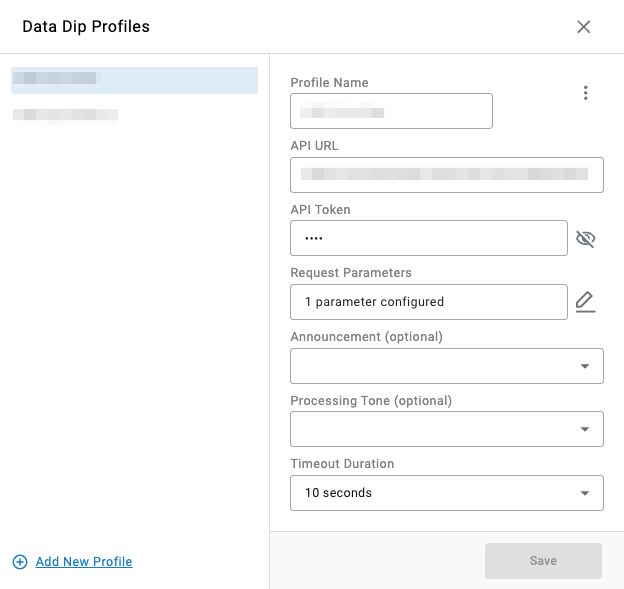
Routing Configuration > Data Dip Profiles - All configured data dip profiles are listed in the modal
Building a Profile
Assigning Profiles to Enable Routing BehaviorCreating a profile does not automatically change routing behavior; the profile must be assigned where it will be evaluated.
- Select
Add New Profilein the bottom-left of the modal - Name the profile
- Configure the required inputs:
API URL— the endpoint where CCaaS sends the data dip requestAPI TOKEN— the bearer token used to authenticate the requestRequest Parameters— one or more key/type/value pairs CCaaS will include in the request payloadTimeout Duration— how long CCaaS waits for a response before continuing the IVR flow
- Optionally configure
AnnouncementandProcessing Tone— audio played to the caller while the data dip is in progress - Click
Saveon the bottom-right of the modal
Updated 3 months ago