
Email - Last Agent Routing
Default Behavior: Last Agent Routing Enabled
By default, if an agent handles an inbound email and responds to the sender, if the original sender replies back in the same thread Xima will prioritize that original agent as the target for the email. The email will be added to the agent's active media. Even if they are occupied with a call, handling a chat or email, and/or on DND. They will be assigned the email. If they are logged out of their agent client, the email will instead be re-queued to the associated skill group.
Disabaling Last Agent Routing
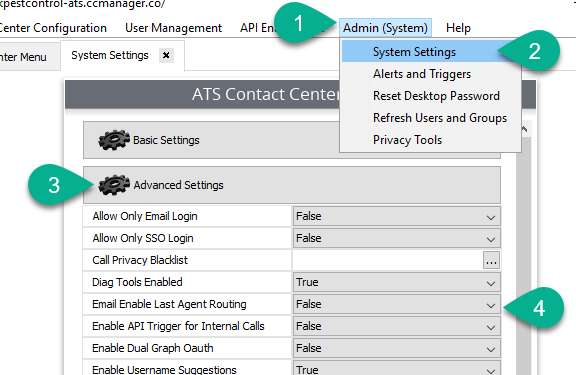
If you'd prefer that every reply from an external source be queued to the skill team and presented to any available agent, you may turn off last agent routing by taking the following steps:
- Navigate to Admin > System Settings > Advanced Settings > Email Enabled Last Agent Routing
- Set the feature as "False"
- Save your changes
Updated 6 months ago