
Supervisor View
Supervisor View is a real-time monitoring interface that gives supervisors and managers live visibility into agent activity, queue conditions, and contact center performance.
Agent states, active calls, queue volumes, and operational metrics are all visible from a single interface. Supervisors can filter the view by agent or skill, adjust display preferences, and take direct action on individual agents — including managing availability, toggling skills, and joining live calls.
Accessing Supervisor View
Supervisor View is accessible to accounts with Supervisor or Admin permissions.
- Navigate to
Realtime Displays > Supervisor View - All Contact Center agents — online and offline — are listed on this page
Customizing Supervisor View


Agents can be sorted by name or extension in ascending or descending order:
Sort by agent name (ASC)Sort by agent name (DESC)Sort by agent extension (ASC)Sort by agent extension (DESC)

Agents can be filtered by selection modes and call event types:
Selection Mode— set toAgent,Group,SkillCall Event Type— filter to one or more event types

Agents can be displayed as tiles or as a table, toggled from the view controls.

The ellipsis opens the global Supervisor View options:
Manage Formulas— create custom metrics calculated from existing metric valuesEdit Summary Metrics— select which metric(s) display at the top of the pageEdit Metrics for All Agents— select which metric(s) display across all agent tiles- Only available when Selection Mode is set to
Skill
- Only available when Selection Mode is set to
Calls and Emails in Queue MovedQueue visibility is no longer part of this menu — see Calls in Queue and Emails in Queue, now their own tabs within Realtime Displays.
Agent Tiles
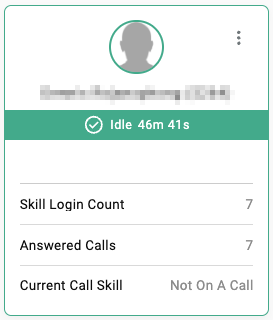
Each agent tile displays:
- Profile picture
- Name and extension
- Phone state and state duration
- Configured metrics
Agent Actions
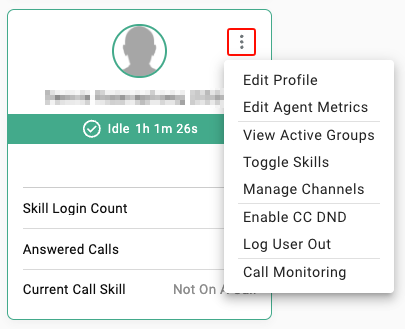
The ellipsis on each agent tile opens per-agent options:
Edit Profile— edit the agent's profile picture and nicknameEdit Agent Metrics— customize which metrics are displayed for this specific agentView Active Groups— view the groups the agent is currently active inToggle Skills— enable or disable specific skills for the agentManage Channels— enable or disable specific multimedia channels for the agentEnable/Disable CC DND— toggle the agent between theReadyandDNDstatesLog User Out— log the agent out of the CC Agent ClientCall Monitoring— join an agent's active call in one of three monitoring modes (see below)
Call Monitoring
WebRTC-OnlyThe Call Monitoring tool is only available for calls within CCaaS WebRTC from the CC Agent Client. This will not work for monitoring calls utilizing a hard-phone or a UC-provided soft-phone.

Call Monitoring allows supervisors and administrators to participate in an agent's live call. Three modes are available:
| Mode | Also Known As | Audio | Agent Notified | Session Behavior |
|---|---|---|---|---|
Listen | Silent Monitoring | Listener hears both parties; neither party hears the listener | No | Continuous until manually ended |
Whisper | Whisper Coaching | Listener hears both parties; agent hears the listener; external party does not | Yes | Active during live calls; pauses between calls |
Join Call | Barge-In | All parties hear each other | Yes | Active only during live calls; must be re-enabled for each subsequent call |
Updated 3 months ago