
Holiday Profiles
Holiday Profiles define date-specific exceptions to standard schedules.
These profiles help determine when routing behavior should change for holidays, office closures, reduced-service days, or other special calendar events that do not follow the normal weekly schedule. They are typically used when different handling is needed for a specific date or limited date range.
These profiles can be referenced by IVR conditions or other supported features to adjust call or chat handling.
System Time-Zone EnforcementThe CCaaS Server time-zone will apply for the configured date(s) and time(s).
Accessing Holiday Profiles
Holiday Profiles are accessible to accounts with Supervisor or Admin permissions.
- Navigate to
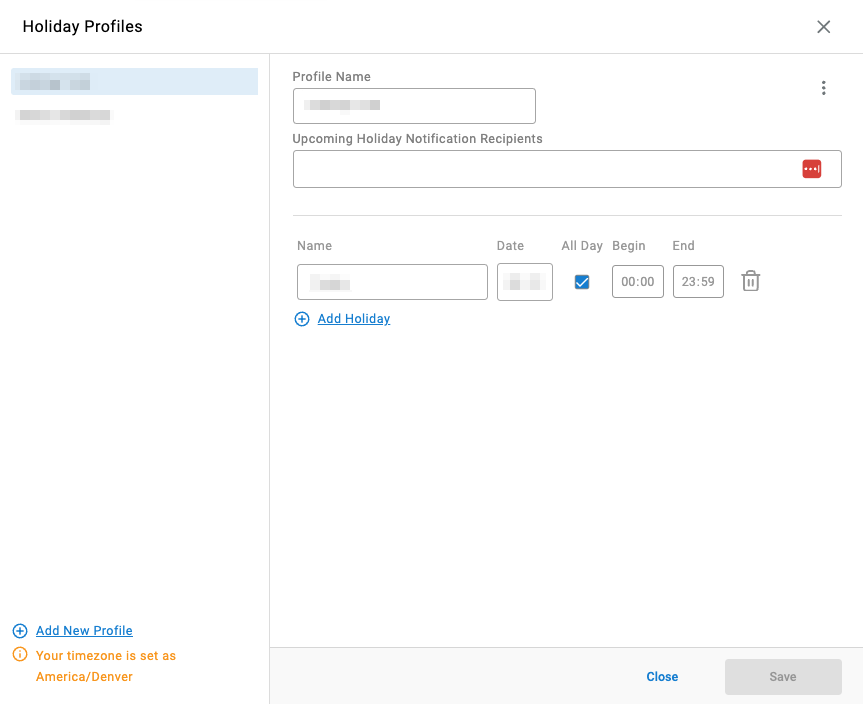
Routing Configuration > Holiday Profiles - All configured holiday profiles are listed in the modal
Building a Profile
Assigning Profiles to Enable Routing BehaviorCreating a profile does not automatically change routing behavior; the profile must be assigned where it will be evaluated.
- Select
Add New Profilein the bottom-left of the modal - Name the profile
- Optionally, configure
Upcoming Holiday Notification Recipients— a list of email addresses to notify ahead of each configured holiday; pressEnteror,after each address to add it - Configure each holiday:
- Name of the holiday
- Date in
MM/DDformat - Select
All Dayto apply the profile for the full calendar day — this disables the time fields - If not all day, configure the start and end time in 24-hour format
- Additional holidays can be added to the same profile by expanding the list
- Click
Saveon the bottom-right of the modal
Updated 3 months ago