
AI Insights
AI Insights are found on the Launch Pad. For an overview of Launch Pad, review the article below
Understanding the Launch Pad and Highlights
Overview

AI Insights are obtained by AI bots analyzing your contact center data overnight. The bots will identify concerning, good, or notable trends with the data. The bots will further dive into the anomalies and perform an investigation by looking through associated metrics for contributing factors and ultimately providing a conclusion and suggestions as applicable.
You'll be able to review the investigation path and findings for each insight by selecting "See more" on the tile.
Insights are organized in order of Concerning > Good > Notable. To see all insights for the given day and previous days (up to 7 days ago), select the "View All" link or the AI Insights tab at the top of the screen.
Expanded Insights
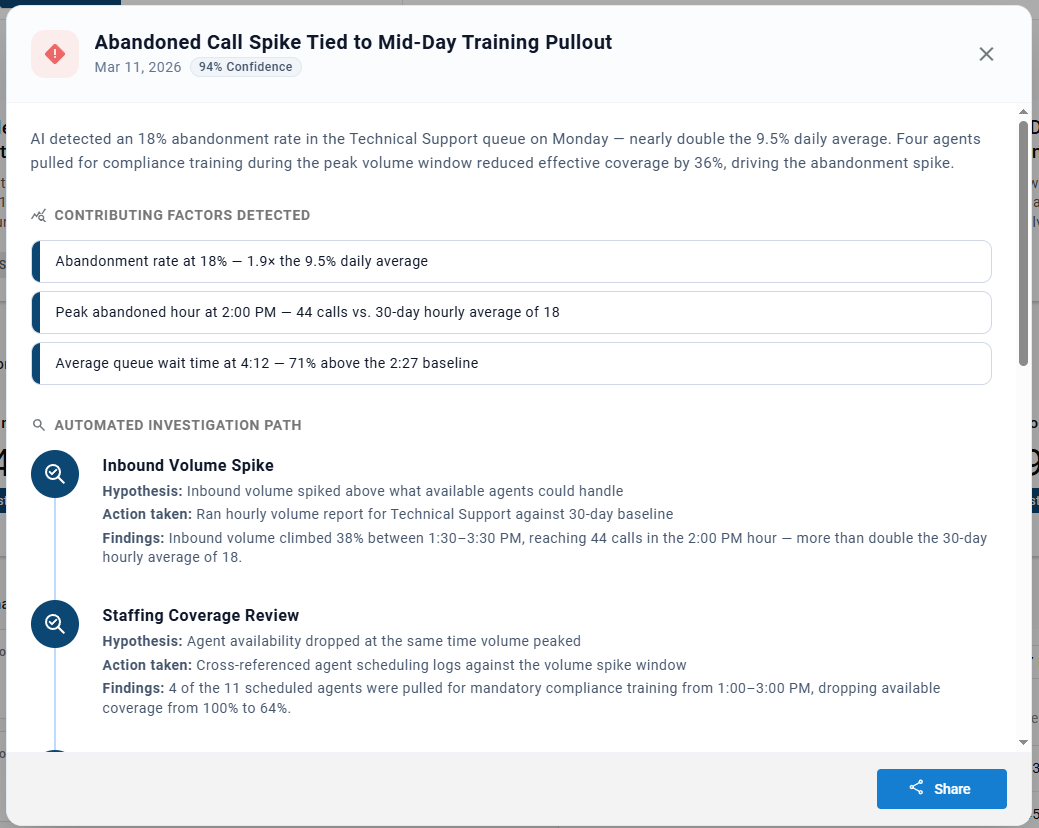
When clicking the "See more" link for an insight you'll see the summary, contributing factors detected, investigation path, conclusion, recommended actions and data gaps. Each will be defined below:
Contributing Factors Detected: Summarizes the conclusive findings from the investigation path. Highlights metrics that were reviewed and likely contributing to the anomaly the insight widget is highlighting.
Automated Investigation Path: Shows the investigative steps the AI bots took to research the anomaly. Each step includes:
- Hypothesis
- A theory that the bot is seeking to prove or disprove with the collected data
- Action Taken
- What actions did the bots take to collect relevant data and test the hypothesis
- Findings
- Reveals the result of comparing the data to the hypothesis. Identifies if the investigation step taken was a contributing factor to the anomaly or not.

Investigation Conclusion: Outlines how the contributing factors detected directly impacted the insight anomaly
Recommended Actions: AI generated recommendations for next steps to take or suggestions of procedural changes to help address the concerning anomaly.
Data Gaps: Outlines some additional areas of data you may consider reviewing to get an even more holistic view of the anomaly. The data is likely outside of the bots access or the CC solution
Sharing Insights
Though many contacts may already be getting emails for the launchpad highlights by being included in the daily digest email, you may desire to share the full details of a particular insight, it's investigation findings, and it's recommended actions with another direct contact or team of agents.
To share an insight
-
Expand the AI Insight
-
Select the "Share" button at the bottom
-
Select the Agents / Roles / User Accounts desired and/or enter the custom email addresses in the available field
-
Select Apply
The destination emails will see an full expanded view of the insight you've shared in their email inbox shortly.
Updated 5 months ago