
Digit Menu Profiles
Digit Menu Profiles define menu options that respond to keypad input during an IVR interaction.
These profiles determine how callers are routed when a specific digit is selected, allowing call flows to present structured self-service options such as reaching a department, accessing a queue, or triggering another menu path. They are commonly used to organize inbound routing and provide callers with clear navigation choices.
Digit Menu Profiles help simplify IVR configuration and make menu behavior easier to manage across the platform. Once assigned within the appropriate routing logic, a Digit Menu Profile can be used to support consistent caller navigation while allowing updates to menu options without rebuilding the full flow structure.
Accessing Digit Menu Profiles
Digit Menu Profiles are accessible to accounts with Supervisor or Admin permissions.
- Navigate to
Routing Configuration > Digit Menu Profiles - All configured digit menu profiles are listed in the modal
Building a Profile
Assigning Profiles to Enable Routing BehaviorCreating a profile does not automatically change routing behavior; the profile must be assigned where it will be evaluated.
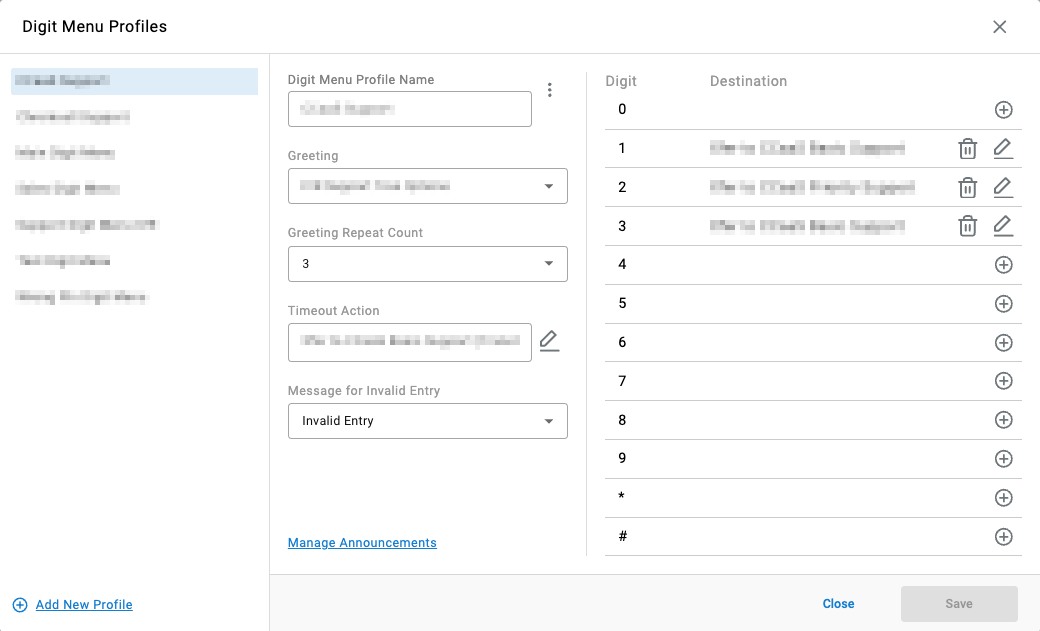
- Select
Add New Profilein the bottom-left of the modal - Name the profile
- Configure the required inputs:
Field Description Greeting an announcement played when the caller enters the digit menu Greeting Repeat Count number of times the Greetingrepeats if no digit is selected or an invalid digit is enteredTimeout Action a terminating action (drop or transfer) triggered when the Greeting Repeat Countis exceeded or no valid selection is madeMessage for Invalid Entry an announcement played when the caller enters a digit not defined in the menu; triggers the Greetingand increments the repeat count - Configure the digit actions — each digit (
0–9,*,#) can be assigned one of the following actions:Forced Announcement— plays an announcement to the callerTransfer— transfers the caller to an IVR, skill, agent, or dialable numberDial by Extension— allows the caller to dial an extension directly:Play Announcement— prompts the caller to enter the party’s extensionTimeout Duration— maximum time given to the caller to enter the extensionInvalid Announcement— played if an invalid entry is entered
- Additional digit actions can be added to complete the menu
- Click
Saveon the bottom-right of the modal
Updated 2 months ago