
Transcription Topics
Transcription Topics allow administrators to define custom subject tags for call transcriptions, enabling the AI to automatically detect and label relevant conversation content. This page also covers how transcription sentiment is scored at the line, turn, and call level.
With a historical transcription license, calls are automatically tagged with generic topics detected during transcription. Custom topics extend this capability by allowing administrators to define specific subjects the AI should watch for — scoped to the organization's industry, product lines, or internal processes. When a custom topic is detected on a call, it is applied as a tag visible in Cradle to Grave and reports.
Voicemails Are Not ScoredVoicemail recordings, for both direct and skill voicemail, are not scored for sentiment or evaluated by AutoQA, so they do not dilute results.
Accessing Transcription Topics
Transcription Topics is accessible to accounts with Admin permissions.
- Navigate to
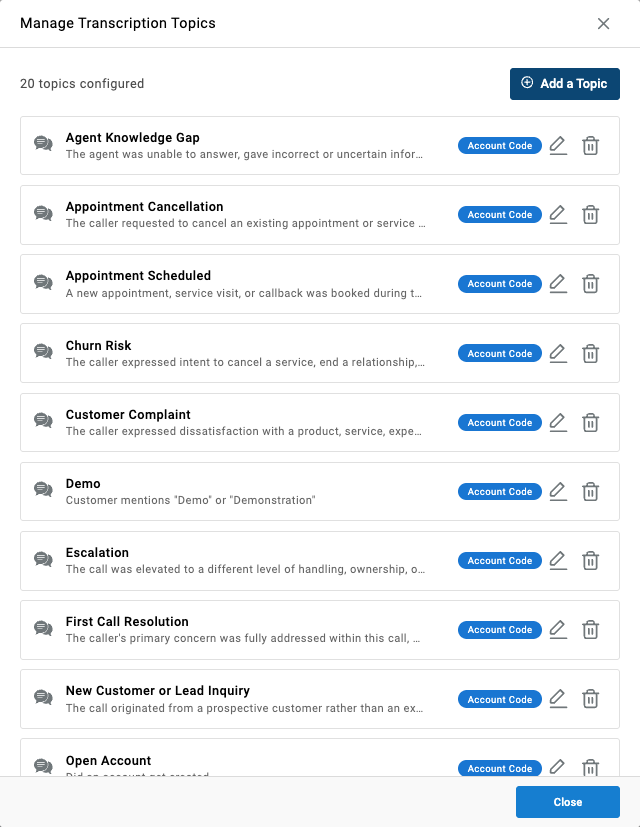
AI Configuration > Transcription Topics - All configured topics are listed in the modal
Adding a Custom Topic
-
Select "Add a Topic"

-
Fill in the topic form:
| Field | Description |
|---|---|
| Topic Name | The label displayed in Cradle to Grave and reports when this topic is detected on a call |
| Topic Description | Guidance for the AI on what to watch for and when to apply this topic. A clear, specific description reduces over- or under-tagging. This field can be adjusted later if tagging accuracy needs refinement |
| Account Code Checkbox | If checked, the topic is automatically associated with the call as an account code when detected |
- Save changes
Managing Existing Topics
All configured topics appear in the Transcription Topics menu. From this list, topics can be edited or deleted using the inline action icons. Topics flagged as account codes display a blue Account Code indicator in the list.
Topic descriptions can be updated at any time to improve detection accuracy without affecting previously transcribed calls.
Transcription Language
Calls are transcribed in the language set on the skill the call is routed through. CCaaS does not detect the spoken language automatically, so the skill's language must match the language spoken on its calls — otherwise transcripts, sentiment, topics, and AutoQA results will be inaccurate.
- Navigate to
Contact Center > Manage Skills - Select the ellipsis next to the skill, then select
Edit - On the
Voice Settingstab, select the language in theTranscript Languagefield - Select
Save
The default language for every skill is English (US). The change applies to future calls only. See Manage Skills for the full list of skill settings.
Use a Dedicated Skill per LanguageSeparate skills for each language — for example, one for English and one for Spanish — keep transcription accurate. A single skill that handles calls in several languages produces poor transcripts.
Transcription Scores
Transcription scores reflect the sentiment of a recorded and transcribed call. Sentiment is analyzed at three levels: the individual line (sentence), the conversation turn, and the overall call.
Sentiment Scale
Each line of a transcript is assigned a sentiment score between -1.00 (extremely negative) and +1.00 (extremely positive). Scores are grouped into three labels:
| Name | Label | Score Range |
|---|---|---|
| Negative |  or  | -1.00 through -0.34 |
| Neutral |  or  | -0.33 through +0.33 |
| Positive |  or  | +0.34 through +1.00 |
Scores by Turn and Line
Within a call transcript, each conversation turn is labeled Negative, Neutral, or Positive. Individual lines within a turn carry color-coded sentiment badges (red, orange, green). When a turn contains lines of mixed sentiment, the turn score reflects the average score of its individual lines.


The average score of individual lines.
Total Call Sentiment Score
In Cradle to Grave, transcribed calls display a sentiment bar showing the distribution of negative, neutral, and positive content across the full call. Hover over the bar to see the percentage breakdown.
The total sentiment distribution is calculated from all individual lines — not from the averaged turn scores. For example, in a call with 10 lines:
- 2 negative lines → 20% Negative
- 5 neutral lines → 50% Neutral
- 3 positive lines → 30% Positive

This percentage breakdown is displayed as the call's total sentiment score.

Updated 19 days ago