
AI Agent — Channels
The Channels step sets where an AI Agent answers — messaging, voice, or both — along with its opening lines, call recording, escalation destinations, and voice settings.
Channels is the second step of the Agent Builder and is required. It turns on messaging, voice, or both, then sets call recording, the bot's opening lines, where each channel escalates conversations the bot cannot resolve, and the bot's spoken voice. Channels also decides which fields the rest of the builder asks for — for example, voice fields appear only when Voice is on.
Accessing Channels
Channels is accessible to accounts with Admin permissions.
- Navigate to
AI Configuration > AI Agent Profilesand select the pencil icon next to an AI Agent - Select
Channelsin the step list; the workspace showsChannels,Recording,Opening,Escalation, andVoicetabs across the top
The right side of the tab bar shows anything still outstanding, or Nothing outstanding when the step is complete.
| Section | What It Sets | Shown When |
|---|---|---|
| Channels | Which channels the bot runs on | Always |
| Recording | Whether calls the bot handles are recorded | Voice is on |
| Opening | The bot's first words on each channel | Always, one area per channel |
| Escalation | Where conversations go when the bot cannot resolve them | Always, one setting per channel |
| Voice | Language, spoken voice, and maximum call length | Voice is on |
Which Channels
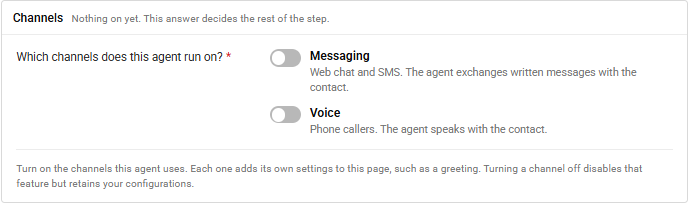
Under Which channels does this agent run on?, turn on one or both channels:
| Channel | What It Covers | Licensing |
|---|---|---|
Messaging | Web chat and SMS. The bot exchanges written messages with the customer | Included with Elite, with an entry allowance of 5,000 messages |
Voice | Phone callers. The bot speaks with the caller | Requires AI Voice minutes and CallHub |
Each channel that is turned on adds its own settings to the page. Turning a channel off disables it but keeps its settings, so it can be switched back on later without starting again. When both are on, the step list shows Channels: Messaging and voice.
Recording

Turning on Record bot calls records the audio for the part of the call the bot handles. It also makes two optional lines available in the voice opening: the recording notice and the recording opt-out offer.
Opening
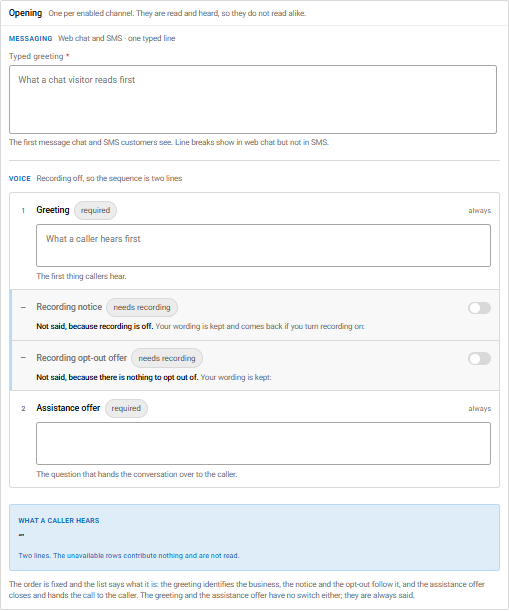
The opening is the first thing a customer reads or hears. Each channel gets its own opening, because written and spoken greetings work differently.
Messaging Greeting
One typed line, required — for example, Thanks for contacting Riverside Clinic. This is Ava, an AI assistant. How can I help today?
Voice Opening
The voice opening is made up of numbered rows that are always spoken in the same order:
| # | Row | Required | Purpose |
|---|---|---|---|
| 1 | Greeting | Required, always said | The first thing callers hear. Identifies the business and the bot |
| 2 | Recording notice | Optional, with its own on/off switch | Tells callers the call may be recorded. Used only when recording is on |
| – | Recording opt-out offer | Optional, with its own on/off switch | Offers callers a way to decline recording. Available only when recording is on |
| 3 | Assistance offer | Required, always said | The question that hands the conversation over to the caller |
The recording notice and the opt-out offer are independent, so either can be used without the other. Below the rows, a What a caller hears preview reads the whole opening back in order, in the chosen voice, to confirm the lines flow naturally together.
Keep the Greeting ShortThe greeting and the assistance offer are always said, so the greeting should not end with a question — leave the question for the assistance offer.
Recording Lines Are for ComplianceThe recording notice and opt-out offer exist to meet call-recording laws in the regions the business operates in. The wording should be checked with whoever handles compliance for the business. The builder recommends announcing recording, but it does not certify that any particular jurisdiction's rules are met.
Escalation
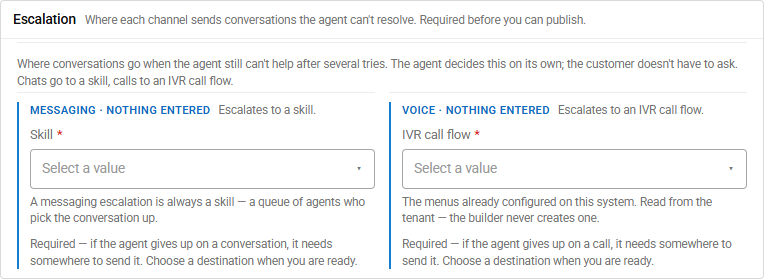
Escalation is the safety net for conversations the bot cannot resolve. If the bot still cannot help after several tries, it hands the conversation to the team on its own — the customer does not have to ask for a person. Each channel that is turned on needs an escalation destination.
| Channel | Escalates To | Notes |
|---|---|---|
| Messaging | A skill | A queue of agents who pick the conversation up |
| Voice | An IVR call flow | Chosen from the call flows already set up on the account. The builder does not create new ones |
Required to PublishThe AI Agent cannot be published until every channel that is turned on has an escalation destination.
Escalation vs. TransfersEscalation is the last resort for when the bot is stuck. Planned hand-offs — such as sending billing questions to the billing team — are set up as destinations in Transfers.
Voice
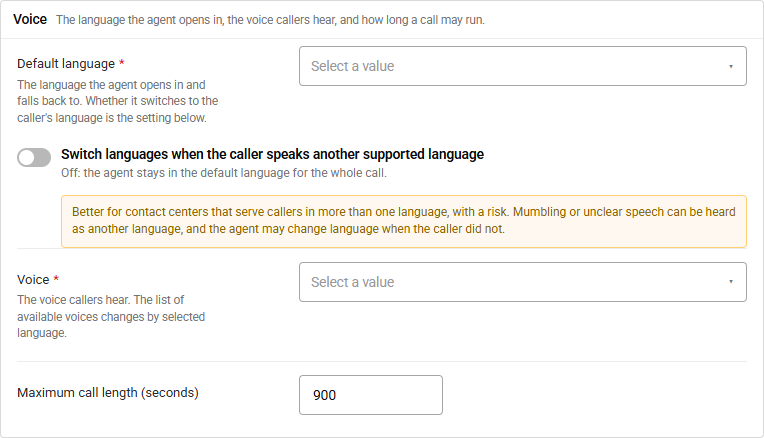
| Field | Description |
|---|---|
Default language | Required. The language the bot starts the call in and falls back to |
Switch languages when the caller speaks another supported language | Off: the bot stays in the default language for the whole call. On: the bot switches to the caller's language when it hears a different supported language |
Voice | Required. The voice callers hear. The list of available voices changes with the default language |
Maximum call length (seconds) | The longest a single call with the bot may run — for example, 900 seconds is 15 minutes |
Language Switching Is a Trade-OffSwitching helps when callers speak more than one language, but mumbled or unclear speech can be heard as another language, so the bot may switch when the caller did not.
Match the Voice to the PersonaA voice should suit the tone chosen in Persona. A
Calm & Reassuringpersona sounds odd in an energetic voice.
Checklist
- Only the channels needed are turned on
- For voice, the decision to record bot calls is made, and the recording notice and opt-out wording are checked with whoever handles compliance
- Each channel has a greeting, and the voice opening sounds right in the
What a caller hearspreview - Each channel has an escalation destination (required to publish)
- For voice, a default language, a voice, and a maximum call length are chosen
Updated about 3 hours ago