
My Reports
My Reports lists every standard and custom report, with options to run, schedule, tag, and manage report access and files.
My Reports is the central list of every report available, standard and custom alike. Reports can be run directly from this list, and the ... menu in the top right corner provides additional management options — assigning roles, scheduling deliveries, organizing with tags, and importing or exporting report files.
Accessing My Reports
My Reports is accessible to accounts with Supervisor or Admin permissions.
- Navigate to
Reports > My Reports - All standard and custom reports are listed on this page
Viewing the Reports List
The list can be switched between two tabs: Reports, which lists all standard and custom reports, and Cradle to Grave, which opens a dedicated interaction-level search tool covered on Cradle to Grave. Each row displays the report's Name, Owner, Type (standard or custom), Run Times, and Last Run date.
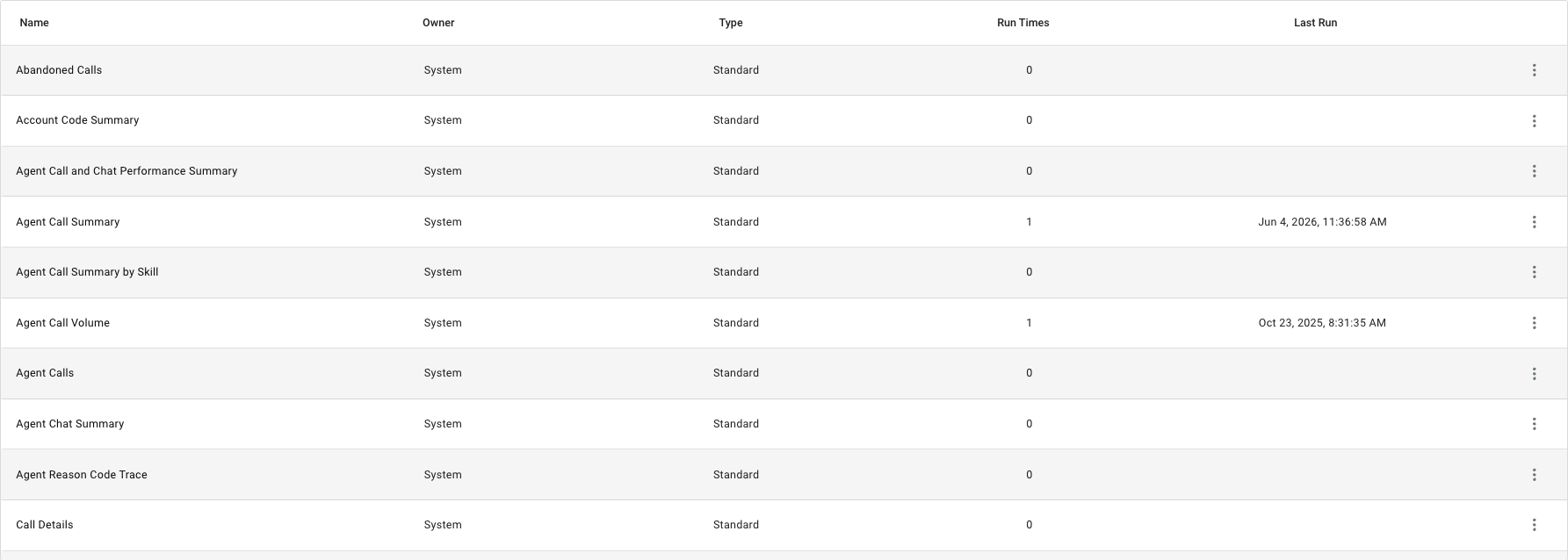
Above the list, an All Tags filter narrows the list to reports sharing a selected tag, and a table/grid toggle switches how the list is displayed. Selecting a report from the list opens it to run.

Selecting a report from the list opens a configuration window scoped to that report's timeframe, rows, and optional filter criteria before it runs.
An existing standard or custom report can be edited using the same builder used to create one.
Once a report has been run, its results can be downloaded to a file in a preferred format instead of only being viewed on screen.
Reports can be delivered automatically on a recurring schedule by email, instead of being run manually each time.
Manage Roles opens CCaaS-wide role management. My Reports is currently the only place this option is surfaced, though roles configured here apply system-wide, not just to reports.
Organizes reports with tags that can be created, applied, and used to filter the reports list.
Shares a custom report between CCaaS instances by exporting it to a file, then importing that file into another instance.
Configures the colors, fonts, layout, and branding applied to a report skin, including creating a custom skin from the built-in default.
Updated 3 months ago