
AI Agent — Integrations
The Integrations step lets an AI Agent take actions in other business systems, such as booking a meeting or opening a ticket, with each capability approved and limited by a plain-language condition.
Integrations let an AI Agent do things in the other business systems a company uses, not just talk about them — for example, checking a calendar for open appointment times, booking a meeting, looking up a caller in a CRM, or opening a ticket. Administrators describe what the bot should be able to do in plain words; the Agent Builder works out which system and permissions that needs, shows exactly what the bot will be allowed to do, and sets it up. Integrations is optional — left empty, the step still counts as finished.
Accessing Integrations
Integrations is accessible to accounts with Admin permissions.
- Navigate to
AI Configuration > AI Agent Profilesand select the pencil icon next to an AI Agent - Select
Integrationsin the step list; the capabilities the bot has are listed underWhat this agent can do in your other systems, with its connections below
Key Terms
| Term | Meaning |
|---|---|
| Capability | One thing the bot can do in another system, such as Book a meeting on your calendar or "Open a ticket for the request" |
| Connection | The link between the account and one other system. There is one connection per system, and several capabilities can run through it |
| When it applies | A sentence saying when the bot should use a capability, and when it should not |
Supported Systems
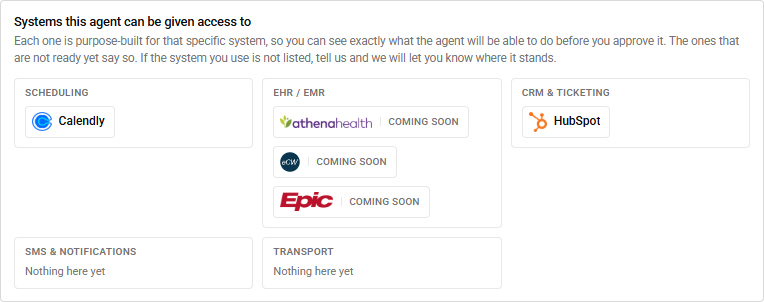
When a capability is added, the builder shows Systems this agent can be given access to, grouped by category. Each system is purpose-built, so exactly what the bot will be able to do is shown before it is approved. Systems that are not available yet are marked Coming soon.
System Not ListedDescribe the need anyway — the builder explains where it stands. The Xima account representative can also help.
Adding a Capability
-
Select
Add -
Under
What do you want this agent to be able to do in another system?, describe it in plain words — for example, "Book a meeting on the team calendar", "Look up the caller's account", or "Open a ticket for the request". A suggestion underCommon askscan also be selected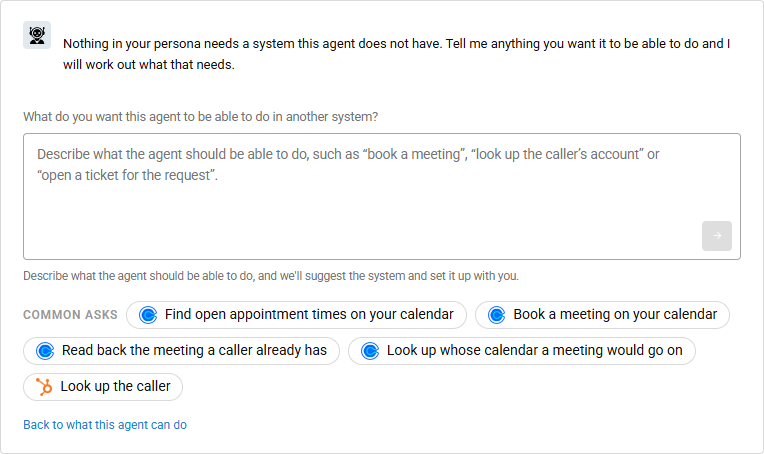
-
Review the system the builder suggests and what it would give the bot, one capability at a time. Each capability is labelled with what it does to the system's data — for example,
Reads onlymeans nothing in the system is changed. Select the system to use it, orSay it another wayto describe the need differently -
Review the plan, which lists every capability the builder will add. Select
Change something in this planto adjust it -
Connect the system if it is not connected already, by signing in to that system and granting permission in its own sign-in window. Use an account that has access to the calendar, records, or tickets the bot will need
-
Enter when the capability applies — see Writing "When It Applies"
-
Select
Done · back to what this agent can do
Selecting Drop this capability partway through discards it. Any connection or permission already given stays as it is.
The Builder Reads the PersonaIf the Persona asks the bot to do something that needs a system it does not have, such as booking appointments, the Integrations step points it out. When nothing is missing, it says so.
Writing "When It Applies"
Before a capability is added, the builder asks when the bot should use it. This sentence is how the bot decides whether to use the capability in a given conversation, so it should say who, when, and when not. One sentence is enough.
| Capability | Weak | Strong |
|---|---|---|
| Book a meeting | "When needed." | "Book only when a patient explicitly asks to schedule a visit. Don't book if they describe urgent or emergency symptoms, only want general information, or ask to speak with a person." |
| Open a ticket | "For issues." | "When a customer explicitly asks to log a ticket or report a problem. Not when they ask for an appointment." |
Be Explicit About "When Not"Capabilities that change something in another system — booking, creating, or updating — should run only when the customer clearly asks. Rule out the cases where acting would be wrong, such as emergencies.
Managing Capabilities
The step lists What this agent can do in your other systems, with a count at the top. Each capability card shows:
- What it does — for example,
Book a meeting on your calendar - Runs through — the system it uses, any specific settings (such as which kind of calendar event it books), and the connection status, such as
Connected - When it applies — the condition sentence
| Action | Description |
|---|---|
Change when it applies | Edits the sentence that decides when the bot uses the capability |
Delete | Removes the capability from the bot |
Automatic Capabilities
Some capabilities are not decided by the bot at all; they run automatically at a set point — for example, logging each conversation on the caller's record when a conversation ends, if the caller was found or saved during it. These cards show When it runs instead of When it applies, and the only choice is whether to keep them.
Managing Connections
Below the capabilities, Connections lists each connected system, its status, and how many capabilities run through it.
| Action | Description |
|---|---|
Reset the connection | Starts the connection over — for example, if the connected account has changed or lost access. Affects every capability that runs through that system |
Remove all | Deletes every capability on the list, along with their "when it applies" sentences. Connections, granted permissions, and settings in the other systems' accounts stay exactly as they are |
Fully Revoking AccessTo fully revoke the bot's access to another system, also remove the app's access from within that system's own account settings.
Best Practices
- Prefer read-only capabilities first. Checking availability or looking up a record is low-risk; add capabilities that change data once the bot's behavior is familiar
- Mention capabilities in the persona. If the bot can book appointments, say so in the intent so it offers the service at the right moments
- Test every capability in each channel. Confirm the bot uses it when it should, and does not when it should not
Checklist
- Each capability the persona promises has been added
- Each connected system uses an account with the right access
- Every capability has a clear "when it applies" sentence that includes when not to act
- Automatic capabilities have been reviewed and are acceptable to run
Updated about 3 hours ago