
Launch Pad — AI Insights
AI Insights are AI-generated cards that flag significant trends from the most recent day of operation, each with an automated investigation, conclusion, and recommended actions.
AI Insights are produced overnight by AI analysis of the contact center's data from the most recent day of operation. When a metric moves significantly — in either direction — the analysis investigates related metrics for contributing factors, then publishes an insight card with its findings, a conclusion, and recommended actions where applicable. The most urgent insights also appear on Highlights.
Requires Elite or QA Evaluation LicensingAI Insights is part of Launch Pad, which is available to tenants licensed for QA Evaluation, which is included with Elite licensing.
Accessing AI Insights
AI Insights is accessible to accounts with Manager or Administrator access levels.
- Navigate to
Launch Pad > AI Insights - Insights from the most recent day of operation and the previous 7 days are listed on this page
Insight Cards
Each card summarizes one finding. Cards are ordered by urgency, with concerning findings first.
| Element | Description |
|---|---|
| Color and icon | Green for a positive trend; red for a high-priority negative trend; orange for a lower-priority negative trend |
| Title | A one-line description of the finding |
| Summary | A short explanation of what was detected |
| Date | The day of operation the data represents, not the day the insight was processed |
| Category | The type of data the insight is based on — for example, KPI, Sentiment, or Topic |
See more | Opens the full investigation for the insight |

Days with No InsightsA day can be analyzed without producing any cards when nothing significant changed. This is expected and does not indicate a problem.
Expanded Insights
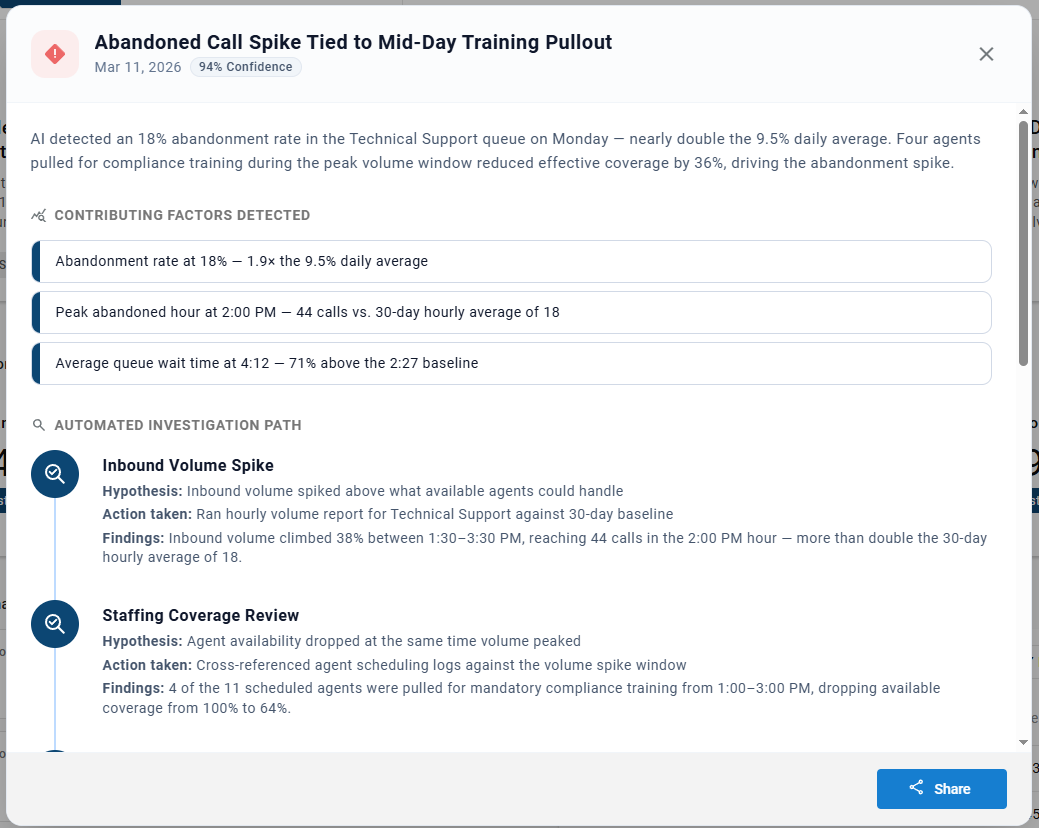
Selecting See more on a card opens its full details, including a confidence percentage for the finding.
| Section | Description |
|---|---|
| Summary | An overview of the finding |
Contributing Factors Detected | The conclusive findings from the investigation — the metrics reviewed that likely contributed to the trend |
Automated Investigation Path | Each step the analysis took to research the trend — see Investigation Steps |
Investigation Conclusion | How the contributing factors affected the trend |
Recommended Actions | Suggested next steps or procedural changes to address a concerning trend. Not shown for positive trends |
Data Gaps | Additional data, usually outside of CCaaS, that could give a more complete view of the trend |
Investigation Steps
| Part | Description |
|---|---|
Hypothesis | A theory the analysis set out to prove or disprove |
Action taken | The data the analysis collected to test the hypothesis |
Findings | The result of comparing the data to the hypothesis, including whether the step was a contributing factor |

Sharing an Insight
An insight's full details — its investigation, conclusion, and recommended actions — can be emailed to other contacts. This is separate from the automated Daily Digest — see Daily Digest.
-
Select
See moreon the insight -
Select
Shareat the bottom of the expanded insight
-
Select the agents, roles, or user accounts to receive it, and/or enter additional email addresses
-
Select
Apply
Each recipient receives the full expanded insight by email shortly after.
Configuring AI Insights
The AI Insights Scope sets the days of operation and narrows what AI Insights analyzes. By default, AI Insights monitors every agent, topic, and skill; the scope narrows that focus by excluding lower-priority areas.
- Select the settings cog in the top-right corner of Launch Pad
- The
AI Insights Scopedialog opens - Complete the following fields:
| Field | Description |
|---|---|
Days of Operation | The days of the week the contact center operates, selected from Sun through Sat — see Days of Operation |
Exclude Agents/Roles | Agents and roles to leave out of the analysis; select the pencil icon to choose them |
Exclude Topics | Transcription topics to leave out of the analysis; select the pencil icon to choose them |
Exclude Skills | Skills to leave out of the analysis; select the pencil icon to choose them |
SLAs | Optional service-level goals; select + to add one, with a name, the skills it applies to, and a speed-of-answer threshold in seconds |
- Select
Apply
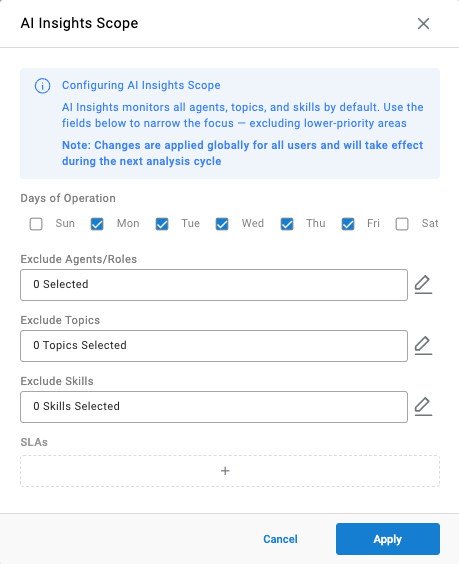
Changes Apply to Everyone at the Next AnalysisScope changes apply globally for all users and take effect during the next analysis cycle, not immediately.
Days of Operation
Days of operation determine which day Launch Pad treats as the most recent. On a Monday at a contact center that operates Monday through Friday, insights, key metrics, sentiment, and the abandoned calls tracker all report on Friday. Non-operational days are also left out of the data the analysis compares against, so low weekend volume does not skew the averages.
Updated about 3 hours ago