
Launch Pad — Metrics Monitor
Metrics Monitor lists every key metric widget, each comparing a metric's value on the most recent day of operation against a chosen baseline and showing the variance.
Metrics Monitor tracks the metrics that matter most to a contact center from one day of operation to the next. Each widget shows a metric's value for the most recent completed day of operation next to a baseline — such as the previous day of operation or the 30-day average — along with the variance between them. The widgets with the largest variances also appear on Highlights.
Requires Elite or QA Evaluation LicensingMetrics Monitor is part of Launch Pad, which is available to tenants licensed for QA Evaluation, which is included with Elite licensing.
Accessing Metrics Monitor
Metrics Monitor is accessible to accounts with Manager or Administrator access levels.
- Navigate to
Launch Pad > Metrics Monitor - Every configured key metric widget is listed on this page
Reading a Metric Widget
| Element | Description |
|---|---|
| Title | The name of the metric widget — for example, Tech Support Answered Calls |
| Baseline | The comparison value on the left, labeled with what it represents — for example, Friday, Last Monday, or 30-day avg |
| Current value | The larger value in the center, labeled with the most recent completed day of operation — for example, Monday |
| Variance | The difference between the current value and the baseline, shown as a percentage or, for durations, a time difference |
| Trend line | A small line chart along the bottom of the widget showing the metric over recent days |

Most Recent Day of OperationThe current value always reflects the most recent completed day of operation, based on the days of operation set in the AI Insights Scope. See Days of Operation.
Viewing a Metric's History
Selecting a widget opens a chart of that metric. The buttons at the top of the chart switch between Past 30 Days, Past 7 Days, and the most recent day of operation, which is shown hour by hour.
Adding a Metric Widget
-
On the Metrics Monitor page, select the option to add a metric widget

-
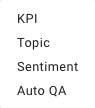
Choose the type of metric — see Metric Types
-
Complete fields as needed
- Save the widget
Metric Types
| Type | Description |
|---|---|
| KPI | A standard contact center metric, such as answered calls, abandoned calls, or average handle time |
| Topic | How often a transcription topic was detected |
| Sentiment | A sentiment measurement from transcribed calls |
| Auto QA | A score from an AutoQA evaluation template |
Compare Against
| Option | Description |
|---|---|
| Previous Workday | The previous day of operation |
| Same Day Previous Week | The same day of the week, one week earlier |
| 7-Day Average | The average across the previous 7 days |
| 30-Day Average | The average across the previous 30 days |
Updated about 3 hours ago