
IVR — Actions
Actions define the behavior that runs at each step of an IVR call flow, from playing announcements to transferring the caller.
Actions are the steps that carry out a task within an IVR flow — playing an announcement, collecting caller input, or transferring the call. See Actions and Conditions for how terminating and non-terminating actions affect the rest of the flow.
Drop Call
A terminating action that immediately disconnects the call.
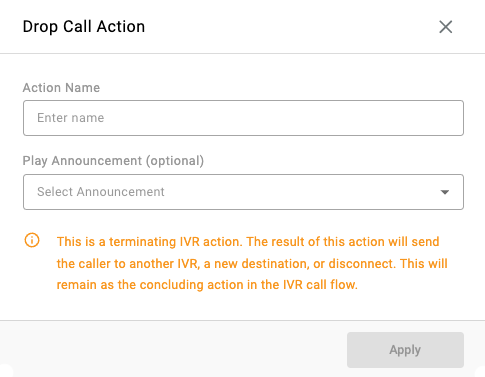
| Field | Description |
|---|---|
| Action Name | Name of the action displayed in reporting and call flows. |
| Play Announcement | Optional announcement played before the call is dropped. |
Use CaseTypically used after playing a final message, handling invalid input, or ending an IVR flow intentionally — for example, after a caller exhausts the maximum number of invalid menu attempts.
Forced Announcement
Plays an audio message that the caller cannot skip.
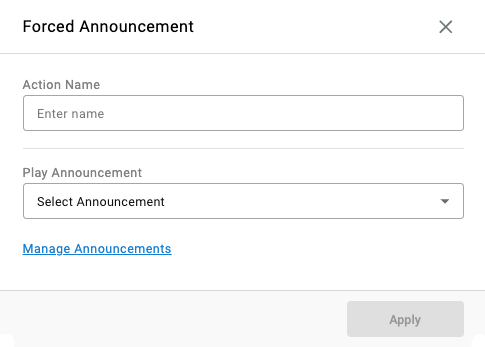
| Field | Description |
|---|---|
| Action Name | Name of the action displayed in reporting and call flows. |
| Play Announcement | The announcement played to the caller. |
Use CaseCommonly used for compliance messages, legal disclosures, emergency notices, or mandatory information before proceeding — for example, a call recording disclosure or a service outage notice.
Recording Notice
Plays an forced announcement disclosing that the call may be recorded, optionally letting the caller opt out of being recorded.
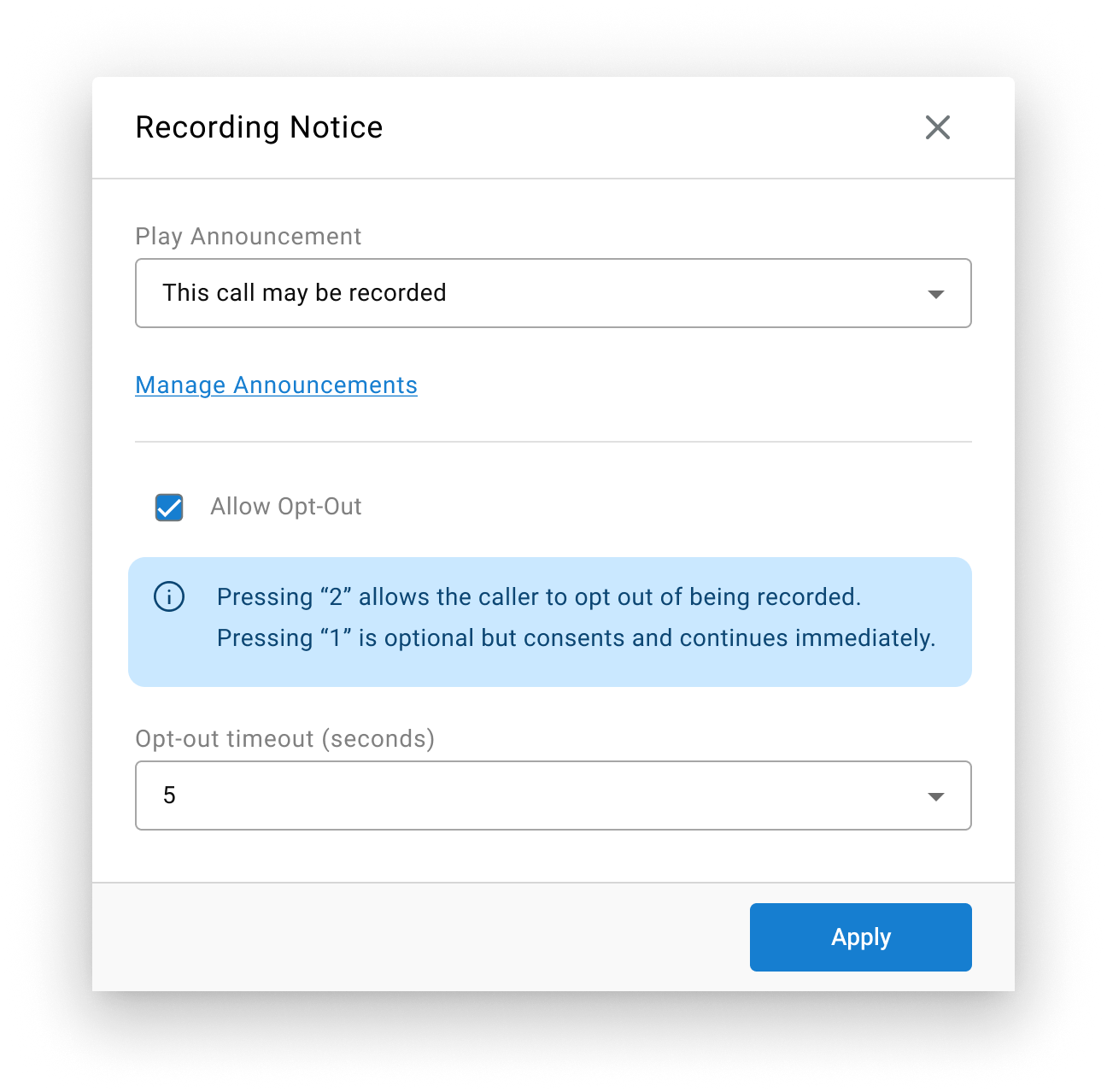
| Field | Description |
|---|---|
| Play Announcement | The forced recording disclosure announcement played to the caller. |
| Allow Opt-Out | When enabled, pressing 1 consents to being recorded and the flow continues immediately; pressing 2 opts the caller out of being recorded. When disabled, the announcement plays with no opt-out choice. |
| Opt-out Timeout (seconds) | How long the IVR action waits for the caller to press 2 before assuming implied consent and moving forward to the next IVR step. If the caller presses 1 during the timeout, it is accepted as recording consent and the flow moves forward immediately. |
Caller Opt-Out Is the Ultimate OverrideIf the caller opts out by pressing
2, the call is never recorded — regardless of any agent- or skill-level recording rules configured elsewhere in the system. Letting the timeout elapse without pressing2is treated as implied consent, the same as pressing1.
The outcome sets a session parameter — recording opt-in true when the caller consents (by pressing 1 or letting the timeout elapse), or recording opt-out true when the caller opts out (by pressing 2) — making the result available for reporting.
Use CaseCommonly used when a customer must be notified that calls may be recorded, especially if they must be offered the ability to opt-out. Consent or rejection will be logged as session parameters.
Use CaseUsed to satisfy call recording disclosure requirements at the start of a flow, while giving the caller a way to opt out before any agent interaction begins.
Transfer
A terminating action that transfers the call to a specified destination such as another IVR call flow, a skill, an agent, or a dialable number.
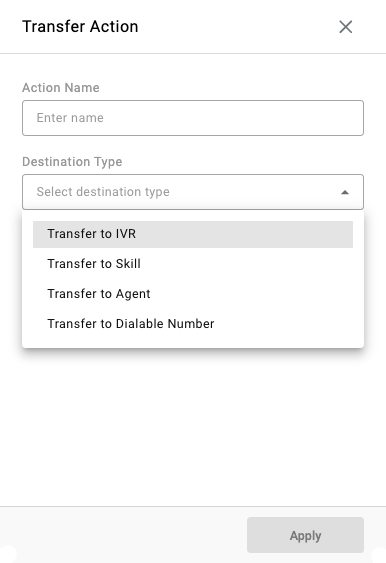
| Field | Description |
|---|---|
| Action Name | Name of the action displayed in reporting and call flows. |
| Destination Type | The transfer target: Transfer to IVR, Transfer to Skill, Transfer to Agent, or Transfer to Dialable Number. |
Use CaseThis action is most often the final step before agent interaction, but it is also used as a sub-action attached to a condition — for example, transferring to a dedicated support IVR once a Parameter condition identifies the dialed number. See Call Routing Methods for a worked example.
Collect Digits
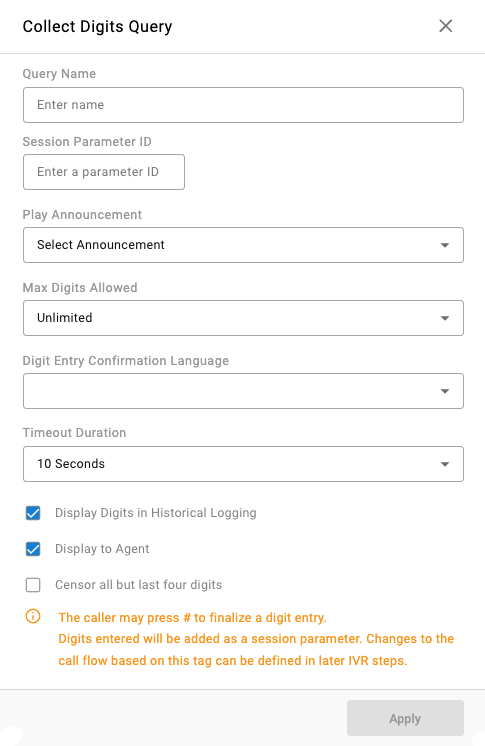
Prompts the caller to enter digits using their keypad (DTMF). The digit entry is finalized by the # key.
| Field | Description |
|---|---|
| Query Name | Name of the action displayed in reporting and call flows. |
| Session Parameter ID | Name of the key for the collected value; available as a parameter for other conditions and actions. |
| Play Announcement | Announcement played when the call flow reaches this action. |
| Max Digits Allowed | The maximum number of digits accepted; defaults to Unlimited. |
| Digit Entry Confirmation Language | The language used for the announcements played during digit entry. |
| Timeout Duration | The maximum time given for the caller to input digits. If this time elapses, the digits entered up to that point are used. |
| Display Digits in Historical Logging | When enabled, the digits entered are displayed in reporting details alongside the session parameter ID. |
| Display to Agent | When enabled, the digits entered are visible to the agent for the call alongside the session parameter ID. |
| Censor all but last four digits | When enabled, only the last four digits entered are displayed in reporting details and to the agent. |
Use CaseUsed for collecting a string of digits such as menu selections, account numbers, PINs, or routing decisions based on caller input. The collected value is stored under the Session Parameter ID and can be read back later in the flow by a Parameter condition — see Parameters for how this value flows through the rest of the call.
Examples could include:
- Account Number
- Extension
- Date of Birth
- Callback Number
Collect Confirmation
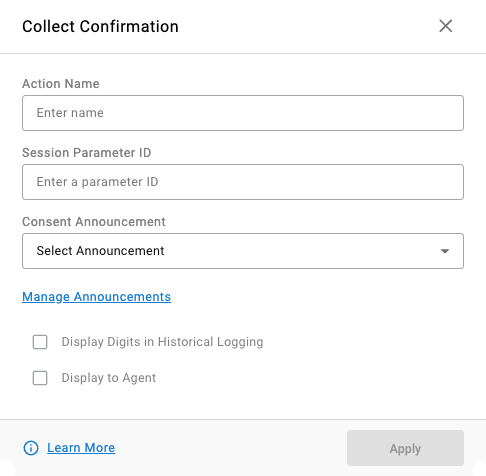
Prompts the caller to enter digits using their keypad (DTMF) to confirm or deny a statement.
| Field | Description |
|---|---|
| Action Name | Name of the action displayed in reporting and call flows. |
| Session Parameter ID | Name of the key for the collected value; available as a parameter for other conditions and actions. |
| Consent Announcement | The announcement presented to the caller requesting confirmation. |
| Display Digits in Historical Logging | When enabled, the confirmation digit entered is displayed in reporting details alongside the session parameter ID. |
| Display to Agent | When enabled, the confirmation digit entered is visible to the agent for the call alongside the session parameter ID. |
Use CaseUsed for collecting binary responses from the caller such as consent to send SMS messages, gathering permissions, and/or acknowledgement of compliance disclosures.
Examples could include:
- "Do you agree?"
- "Do you want to continue?"
- "Do you approve this action?"
- "May we text you?"
Confirm Caller Number
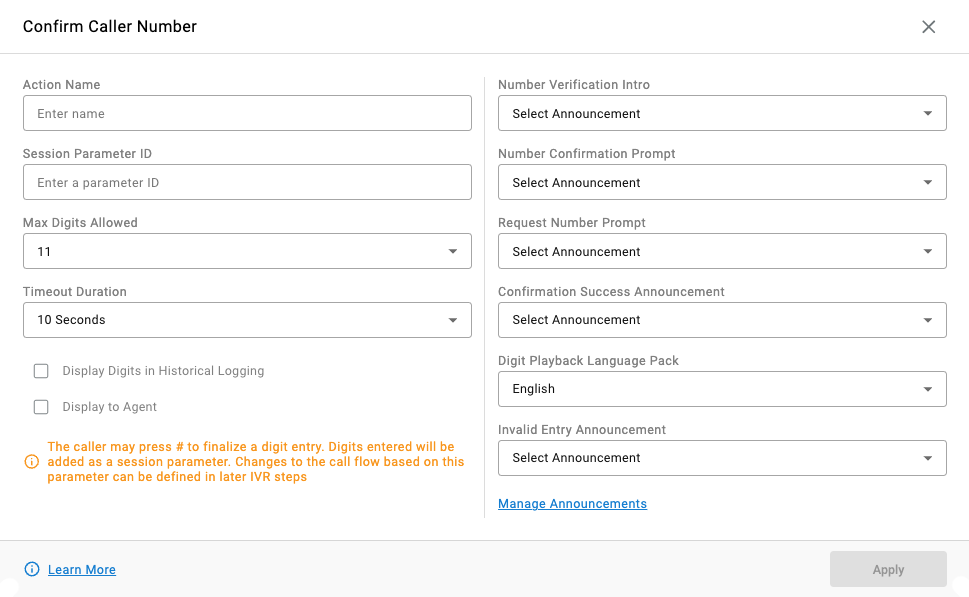
Prompts the caller to confirm their phone number using their keypad (DTMF).
| Field | Description |
|---|---|
| Action Name | Name of the action displayed in reporting and call flows. |
| Session Parameter ID | Name of the key for the collected value; available as a parameter for other conditions and actions. |
| Max Digits Allowed | The maximum number of digits accepted; defaults to Unlimited. |
| Timeout Duration | The maximum time given for the caller to input digits. If this time elapses, the digits entered up to that point are used. |
| Display Digits in Historical Logging | When enabled, the confirmation digit entered is displayed in reporting details alongside the session parameter ID. |
| Display to Agent | When enabled, the confirmation digit entered is visible to the agent for the call alongside the session parameter ID. |
Announcement Settings
| Field | Description |
|---|---|
| Number Verification Intro | The first announcement played to the caller, reading back the digits entered for verification. |
| Number Confirmation Prompt | The second announcement, asking the caller to confirm the digits are correct — 1 to confirm, 2 to reject. |
| Request Number Prompt | Played if the caller rejects the Number Confirmation Prompt, prompting them to re-enter the digits. |
| Confirmation Success Announcement | Played once the caller confirms the digits are correct. |
| Digit Playback Language Pack | The language used for the announcements played during confirmation. |
| Invalid Entry Announcement | Played if the caller enters an invalid entry. |
Use CaseUsed for confirming a callback number or a phone number to text and/or receive calls, with a built-in read-back and re-entry loop so the value stored is verified before the flow continues.
Set Parameter
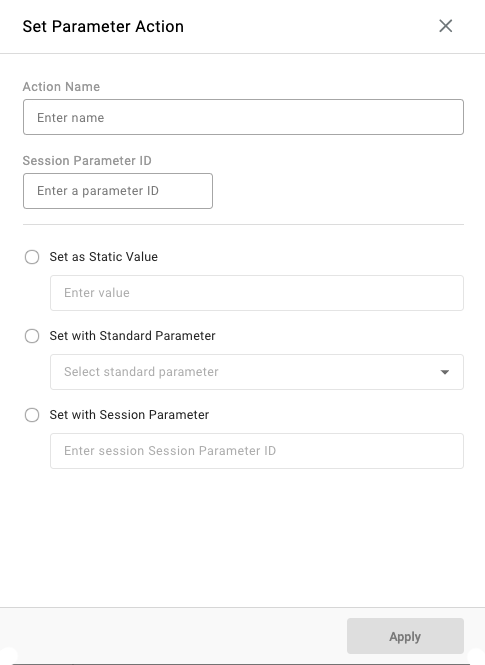
An action that changes the behavior of the call flow and/or displays data to agents or in reporting.
| Field | Description |
|---|---|
| Action Name | Name of the action displayed in reporting and call flows. |
| Session Parameter ID | Name of the key for the value; available as a parameter for other conditions and actions. |
Select one parameter source
| Field | Description |
|---|---|
| Set as Static Value | Assigns a fixed string of text as the value whenever this action is triggered. |
| Set with Standard Parameter | Assigns the value from a dropdown of existing standard parameters. |
| Set with Session Parameter | Assigns the value from an existing Session Parameter ID. |
Use CaseUsed to carry state forward through the rest of the call flow, independent of caller input. Examples include:
- Marking that a call recording disclosure has already been announced, so it is not repeated later in the flow
- Flagging that the caller is a specific type of member
- Recording that the caller passed identity verification, so downstream skills or groups do not repeat the check
Data Dip
An action used to request data from a database in a call flow.
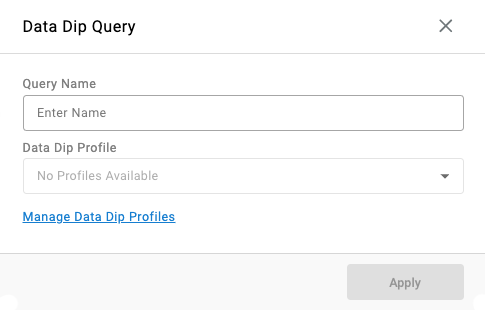
| Field | Description |
|---|---|
| Query Name | Name of the action displayed in reporting and call flows. |
| Data Dip Profile | The Data Dip Profile executed as this action. |
Use CaseUsed for changing the call behavior based on data requested from a database about the calling party, displaying data from a database to agents during a live call, and/or displaying data from a database in reporting. The returned value is stored as a parameter, the same way a Collect Digits or Set Parameter action stores one, so it can be read back later by a Parameter condition.
Digit Menu
A terminating action that transfers the caller out of the IVR and into a Digit Menu.
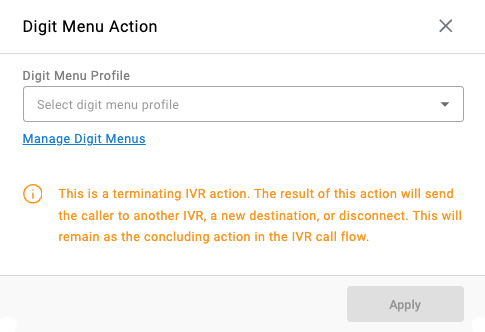
| Field | Description |
|---|---|
| Digit Menu Profile | The Digit Menu Profile the caller is transferred into. |
Use CaseUsed for completing an IVR by handing the caller off into a "phone-tree" of further menu options.
Send SMS
An action that sends an SMS message to the caller or a verified number and can receive a reply.
Consent Required for SMS MessagesA documented consent must be obtained from the caller for SMS messaging. Consent should include clear information about SMS purposes, the applicable privacy policy, and instructions for HELP and STOP (opt-out). SMS-enabled numbers must be registered with The Campaign Registry and comply with the applicable 10DLC requirements.
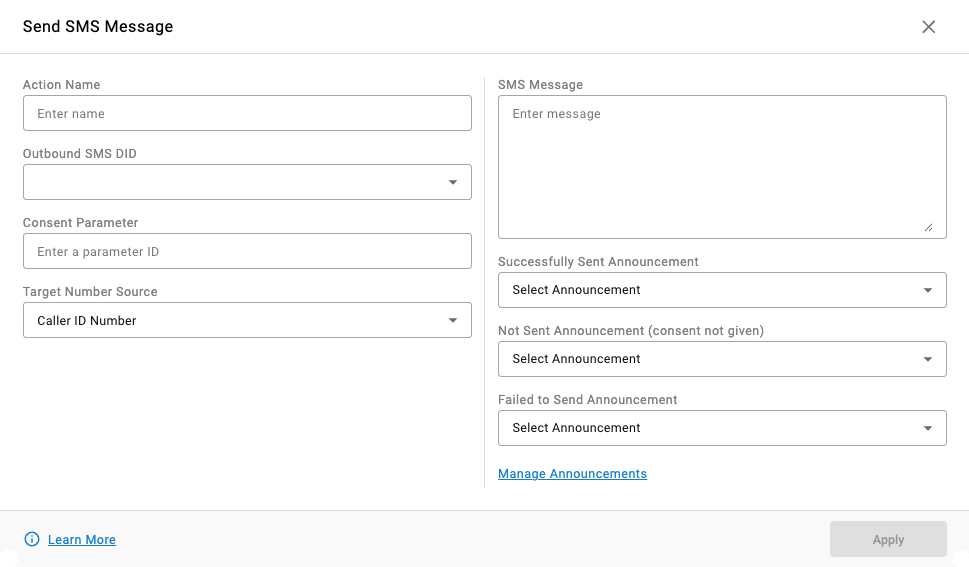
| Field | Description |
|---|---|
| Action Name | Name of the action displayed in reporting and call flows. |
| Outbound SMS DID | Dropdown to select the outbound SMS number used to send the message. |
| Consent Parameter | The Session Parameter ID used to check for SMS consent. |
| Target Number Source | Caller ID Number uses the caller's caller ID number as the SMS destination. Verified Number uses a Session Parameter ID obtained from caller input by another action, set via Target Number Session Parameter. |
SMS Settings
| Field | Description |
|---|---|
| SMS Message | The text sent to the target SMS number. |
| Successfully Sent Announcement | Played when the SMS was consented to and sent successfully. |
| Not Sent Announcement | Played when the SMS was not consented to and therefore not sent. |
| Failed to Send Announcement | Played when the SMS message failed to send. |
Updated 2 months ago