
IVR — Components
Actions and Conditions are the building blocks that determine what happens at each step of an IVR call flow.
An IVR call flow is built from two kinds of building blocks. A Condition evaluates something about the call — a keypress, a stored value, the time of day — and produces a met or not-met outcome. An Action carries out a task, such as playing an announcement, collecting input, or transferring the caller. Chaining these together top to bottom lets administrators build call flows that branch and adapt based on who is calling, when, and what they enter.
How a Call Flow Evaluates
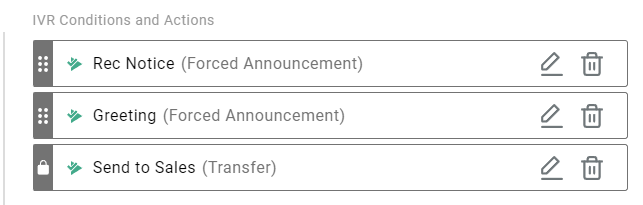
Each step in an IVR is evaluated in order, from top to bottom. Actions run unconditionally when the flow reaches them. Conditions evaluate their check and produce one of two outcomes:
- Met — any sub-action attached to the condition runs
- Not met — the flow falls through to the next step below the condition, which may be another condition checking for a different value
This fall-through behavior is what allows multiple conditions to be stacked in sequence — each one checking for a different value, destination, or schedule — without requiring every possible outcome to be handled by a single condition.
For the full set of available actions and conditions, see Actions and Conditions.
Terminating Actions
Terminating ActionA terminating action is an action in the IVR that results in the caller leaving the current IVR.
Drop Call, Transfer, and Digit Menu are terminating actions — once one of these runs, the caller has left the current IVR flow entirely, either by disconnecting, transferring to another destination, or entering a Digit Menu profile. No further actions or conditions below a terminating action are evaluated for that call.
All other actions — Forced Announcement, Collect Digits, Collect Confirmation, Confirm Caller Number, Set Parameter, Data Dip, and Send SMS — are non-terminating. The caller remains in the IVR after these run, and the flow continues to the next step below them.
Sub-Actions and Nesting
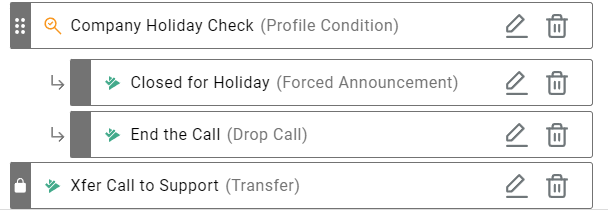
A sub-action falls under a condition and only runs when that condition's outcome is met. Nesting works in one direction only: a sub-action can be attached to a condition, but a condition cannot be nested as a sub-condition under an action. This keeps every condition evaluated at the top level of the flow, in the order it appears.
In practice, this means a call flow is built by stacking conditions in sequence, each with the action that should run if that specific condition is met, and letting every condition that is not met fall through to the one below it. A common pattern is a chain of Parameter conditions, each checking for a different value, with a Transfer sub-action attached to each — the call keeps falling through the chain until one condition matches.
For a walkthrough of this pattern, see Call Routing Methods.
Updated 2 months ago