
MS — SIP Extensions
Registers the Metaswitch virtual handset subscriber's SIP credentials in CCaaS so the contact center can handle calls through the platform.
Registering a SIP extension for Metaswitch uses the same virtual handset subscriber created for Target Platform, plus SIP credentials obtained from that subscriber's Connection tab in the MetaView Web Portal.
Accessing SIP Extensions
SIP Extensions is accessible to accounts with Admin permissions.
- Navigate to
Admin (System) > SIP Extensions - All registered SIP extensions are listed on this page
Target Platform Must Be Configured FirstTarget Platform must be configured before registering an extension.
Obtaining SIP Credentials from Metaswitch
- Open the virtual handset subscriber created for Target Platform in the MetaView Web Portal
- Select the
Connectiontab and note the SIP Password
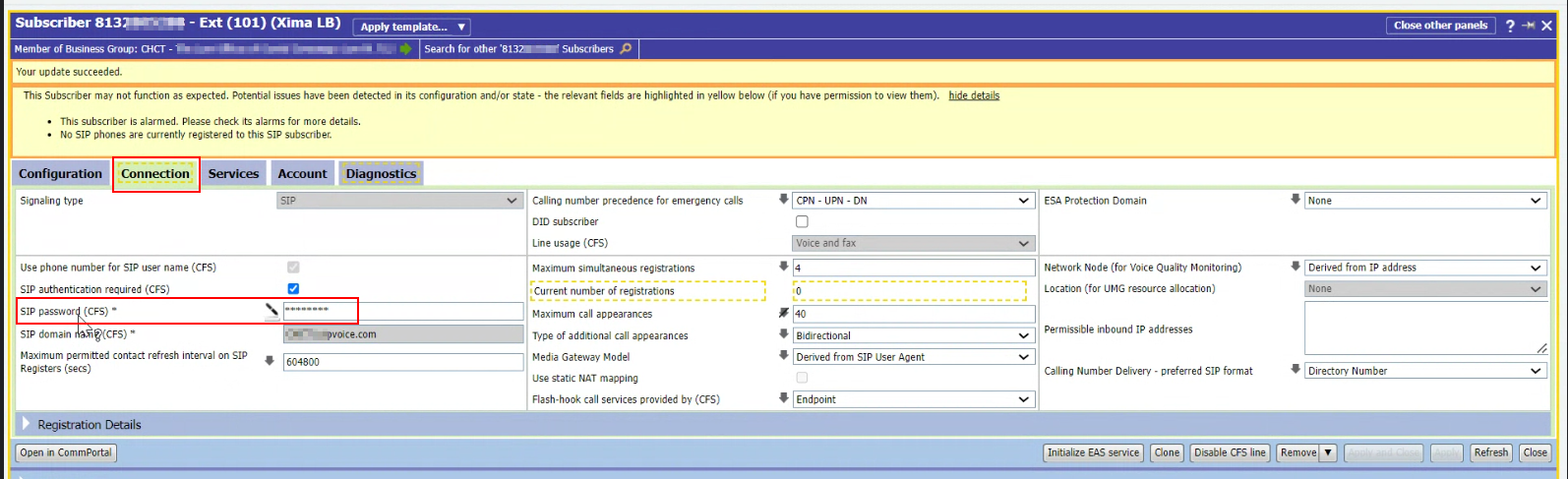
Not the EAS PasswordThis SIP Password is distinct from the EAS Password used for API Information under Target Platform.
Registering the Extension in CCaaS
- Navigate to
Admin (System) > SIP Extensions - Select
+ - Enter the following fields:
| Field | Description |
|---|---|
| SIP Extension | The extension of the virtual handset subscriber |
| SIP User | The subscriber's phone number |
| SIP Password | The password noted above from the subscriber's Connection tab |
- Registration typically completes within a few minutes — the extension shows as
Registeredonce successful
Updated about 2 months ago