
SIP Extensions
SIP Extensions manages the SIP extensions and outbound numbers CCaaS uses to receive inbound calls and to place outbound calls with the right caller ID.
SIP Extensions connects CCaaS to the phone system. Each extension registered here is a SIP endpoint configured on the phone system side, and the credentials entered must match it. Inbound extensions carry calls into the contact center, while outbound extensions and outbound numbers define the caller IDs agents present when they call out. Supported device types and phone-system prerequisites vary by platform — see Target Platform for the platform connection step that must be completed first.
Accessing SIP Extensions
SIP Extensions is accessible to accounts with Admin permissions.
- Navigate to
Admin (System) > SIP Extensions - The
SIP Extensionsmodal listsInbound Extensions,Outbound Extensions, andOutbound Numbersas separate sections
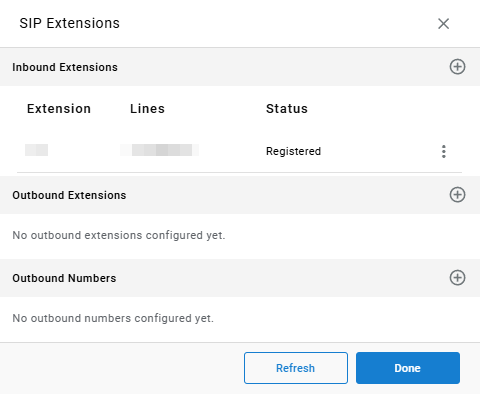
Select Refresh to update each extension's registration status, or Done to close the modal.
Target Platform Must Be Configured FirstTarget Platform must be configured before registering an extension.
Registered SIP extensions that receive inbound calls. Inbound calls are distributed only across inbound extensions.
Registered SIP extensions that agents place outbound calls through, each presenting its own outbound caller ID and optionally assigned to a skill or agent.
Caller ID numbers with no registered extension behind them. Outbound calls go out through any available extension while presenting the chosen number.
Use Either an Outbound Extension or an Outbound NumberConfigure each caller ID number in only one of the two outbound sections. Adding the same number as both an outbound extension and an outbound number can cause the caller ID to change between calls.
Platform Setup
The phone-system side of each extension is configured on the platform first. See the platform's SIP Extensions page:
| Platform | Description |
|---|---|
| NetSapiens | Registers a NetSapiens virtual handset extension so CCaaS can send and receive calls through the NetSapiens platform |
| RC/ACO | Connects a UCaaS user account to CCaaS so the contact center can handle calls through the platform |
| 3CX | Registers a 3CX extension's SIP credentials in CCaaS |
| Metaswitch | Registers the Metaswitch virtual handset subscriber's SIP credentials in CCaaS |
Reconnect on ChangeAdding or modifying a SIP extension triggers a reconnect of all registered SIP extensions. Schedule changes during low-traffic periods when possible.
Routing Calls Directly to an Agent
A call can be routed directly to a specific agent's SIP extension without any routing rule configured in CCaaS, by including extXXX — where XXX is the agent's extension number — in one of the following SIP headers:
FromReferred-ByP-Asserted-IdentityX-Xima-Agent
The extension number can be any number of digits (for example, extX or extXXXXXXXXX).

Updated 14 days ago