
SMS Numbers
SMS Numbers manages the labels assigned to SMS-enabled DIDs, controlling which outbound numbers are available for agents to select when sending outbound SMS messages.
When agents send outbound SMS messages, the number displayed to the recipient depends on which DID (direct inbound dial number) is selected. The SMS Numbers menu lists all numbers enabled for SMS on the connected UC platform and allows administrators to assign a label to each. Only labeled numbers are visible to agents for selection — unlabeled numbers are hidden from the outbound SMS dial interface.
If a desired number does not appear in this list, verify that it is enabled for SMS within the UC platform.
Accessing SMS Numbers
SMS Numbers is accessible to accounts with Supervisor or Admin permissions.
- Navigate to
Admin (System) > SMS Numbers - SMS Numbers can be viewed and managed from this page
Assigning Labels to SMS Numbers
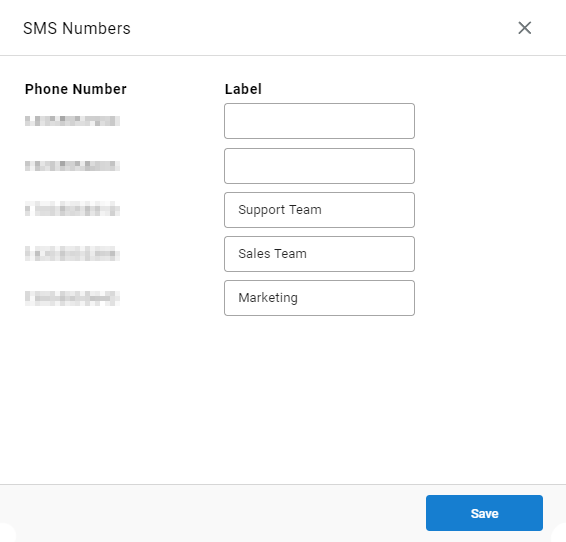
- The list displays all SMS-enabled numbers provisioned on the UC platform
- Enter a label for each number that should be available to agents (e.g., "Sales", "Support")
- Click
Saveto save changes
Blank LabelsNumbers without a label are not visible to agents in the outbound SMS interface. This is useful for numbers that should not be used directly by agents.
Agent Experience — Selecting an Outbound DID
When initiating a new outbound SMS from CCAC, the currently assigned outbound number is displayed in the dial interface. Agents can select a different labeled number by clicking the dropdown next to the displayed number and choosing from the available labels.
10DLC Compliance and Registration
SMS messaging over 10-digit long codes requires carrier-mandated campaign registration. This includes consent collection (opt-in), call to action (CTA) documentation, opt-out message requirements, Privacy Policy and Terms & Conditions compliance, and campaign attribute configuration. See the linked page for full requirements and common rejection reasons.
Covers the 10DLC registration requirements for business SMS campaigns — opt-in types, CTA examples, opt-out requirements, SHAFT-C prohibited content, Privacy Policy and Terms & Conditions requirements, and campaign attribute checklist.
Describes the campaign categories available during 10DLC registration, each corresponding to a specific messaging use case and business type. Selecting the correct campaign type and matching sample messages to the use case is required for successful vetting.
Updated 3 months ago