
Park Zones (CallHub Only)
Park Zones are named holding areas where an agent can place an active call for another agent to retrieve, with each zone holding multiple calls at once in numbered slots.
A park zone lets an agent place an active call on hold in a shared location, rather than transferring it directly, so any agent assigned to that zone can retrieve it. A Default Zone is provided out of the box, and additional zones can be created to organize parked calls by team, purpose, or department.
Requires CallHub and Either Call Link or Xima WebRTCPark Zones is not enabled for every site. Contact Xima Support to confirm eligibility.
Accessing Park Zones
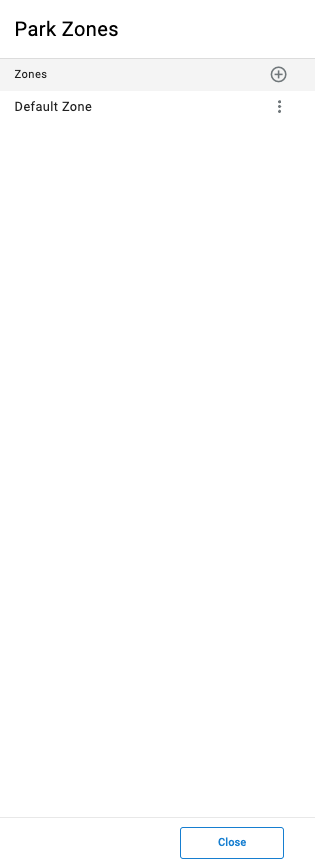
Park Zones is accessible to accounts with Supervisor or Admin permissions.
- Navigate to
Contact Center > Park Zones - All configured park zones are listed in the modal
Creating a Park Zone
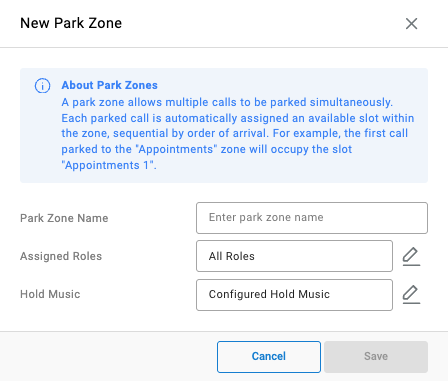
About Park ZonesA park zone allows multiple calls to be parked simultaneously. Each parked call is automatically assigned an available slot within the zone, sequential by order of arrival. For example, the first call parked to the
Appointmentszone will occupy the slotAppointments 1.
- Select the
+icon next toZones - Complete the following fields:
| Field | Description |
|---|---|
Park Zone Name | The name of the park zone |
Assigned Roles | The roles that can park calls to and retrieve calls from this zone; select the pencil icon to choose one or more roles, or leave All Roles to allow every role |
Hold Music | The audio played to the parked party while waiting; select the pencil icon to choose a specific track, or leave Configured Hold Music to use the account default |
- Select
Save
Editing or Removing a Park Zone
Selecting the ellipsis next to a zone in the list provides options to edit or remove it.
Updated about 1 month ago