
Manage Announcements
Manage Announcements is a centralized library of audio announcements used across IVR flows and skill queues.
Manage Announcements centralizes every announcement used across the platform into a single library — including announcements played during IVR call flow actions and announcements played to callers waiting in a skill queue. Announcements can be previewed, renamed, re-recorded, downloaded, or removed directly from this list, and the same library is available when selecting an announcement anywhere one is required, such as an IVR action, a Digit Menu Profile, or a skill's queue announcement schedule.
Accessing Manage Announcements
Manage Announcements is accessible to accounts with Supervisor or Admin permissions.
- Navigate to
Routing Configuration > Manage Announcements - All announcements are listed in the modal, each labeled
IVR AnnouncementorQueue Announcement
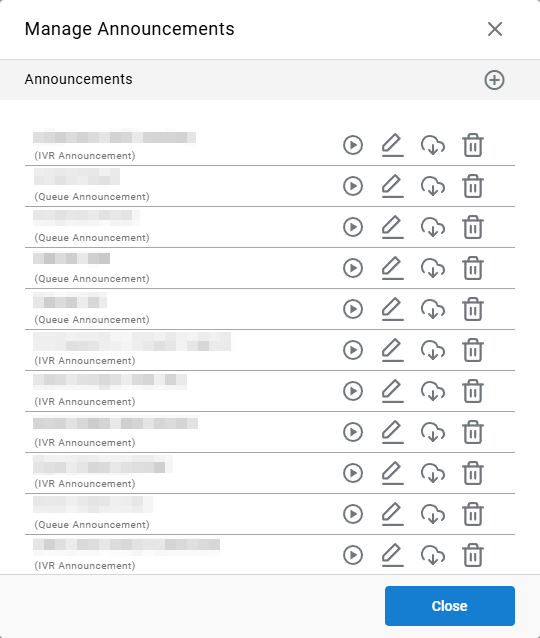
Managing the Announcement Library
Each announcement in the list includes its name, its type, and a set of actions:
| Icon | Action |
|---|---|
 | Previews the announcement audio. |
 | Edits the announcement type and audio. |
 | Downloads the announcement's audio file. |
 | Removes the announcement from the library. |
Before DeletingConfirm an announcement is not actively referenced by an IVR action, Digit Menu Profile, or skill queue before deleting it.
Adding a New Announcement
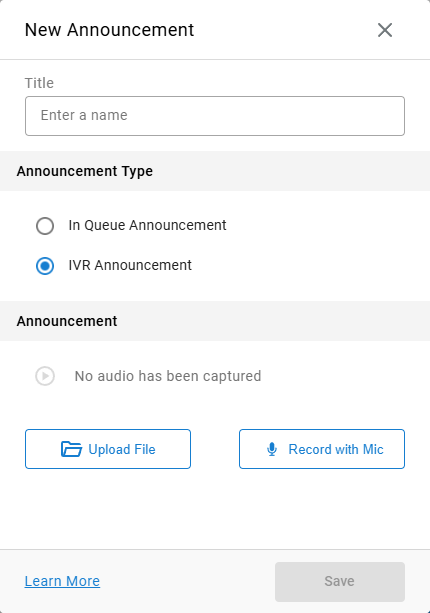
- Click the
+icon in the top-right of the Announcements list - Enter a name in the
Titlefield - Select the
Announcement Type—In Queue AnnouncementorIVR Announcement - Click
Upload Fileto upload an audio file, orRecord with Micto record one using the computer's microphone - Click
Save
Adding vs. Scheduling an AnnouncementManage Announcements is the library for these audio files, but announcements can also be selected, added, or scheduled directly from within the IVR builder or Manage Skills, without needing to open this page separately.
Updated 2 months ago