
Data Dip — Web Service Connection
Requirements and specifications for building a web service that integrates with CCaaS data dip requests.
Web Service RequiredFor the IVR to perform a data dip, a web service must be provided by an external database, CRM, or other data service. CCaaS reaches out to that service with a URL, a bearer token, and a JSON payload. The web service must authenticate the request and reply with a JSON payload in the expected format.
Integration Values Required for CCaaS
The following values must be collected from the web service and entered into the Data Dip Profile in CCaaS. See Building a Profile for configuration steps.
- API URL — the endpoint where CCaaS should send data dip requests
- Bearer/Auth API Token — a token accompanying all requests from CCaaS to authenticate with the web service
- Parameter Key(s) — the key name(s) CCaaS will include in each request payload, paired with the call's corresponding value (e.g.,
PhoneNumwith the caller's ANI, orAccountNumberwith a value collected earlier in the IVR)- Multiple keys can be provided; the request will include all configured keys and their values
- The web service is responsible for determining how to prioritize multiple keys
Requests from CCaaS
CCaaS sends a POST request to the configured API URL. The request includes the bearer token in the Authorization header and the configured parameter keys with their values in the request body.
Request headers:
POST <API_URL> HTTP/1.1
Content-Type: application/json
Authorization: Bearer <api_bearer_token>
Request body example:
{
    "account-num": "76541643",
    "phone-num": "8015551234"
}
In this example, two request parameters are included: account-num and phone-num.
The web service is responsible for:
- Authenticating the request using the provided bearer token
- Identifying which key to prioritize when multiple parameters are provided
- Searching the connected data source using the provided key values
- Returning the result in the expected JSON format
Expected Response Format
CCaaS expects the response payload to be in JSON format with the following structure:
{
    "parameters": {
        "<key>": {
            "value": "<returned value>",
            "displayToAgent": true,
            "saveToDatabase": true
        }
    }
}
Multi-value response example:
{
    "parameters": {
        "account-manager": {
            "value": "Sam Whitecar (112)",
            "displayToAgent": true,
            "saveToDatabase": false
        },
        "account-num": {
            "value": "76541643",
            "displayToAgent": true,
            "saveToDatabase": true
        },
        "name": {
            "value": "Tom Callahan",
            "displayToAgent": true,
            "saveToDatabase": true
        },
        "is-vip": {
            "value": "true",
            "displayToAgent": true,
            "saveToDatabase": true
        },
        "language": {
            "value": "English",
            "displayToAgent": false,
            "saveToDatabase": false
        }
    }
}
Response Parameters: displayToAgent and saveToDatabase
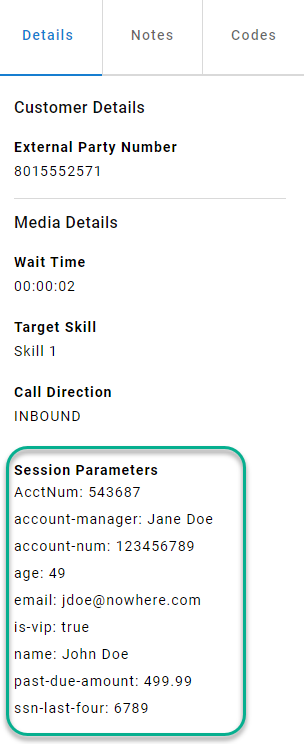
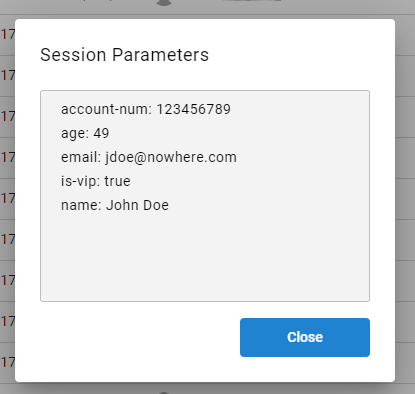
displayToAgent and saveToDatabaseEvery returned value becomes a session parameter in CCaaS. Two fields control visibility and logging for each value:
displayToAgent
displayToAgentWhen set to true, the value is displayed to the agent during the live call in CC-Agent Client.
saveToDatabase
saveToDatabaseWhen set to true, the value is written to CCaaS' historical database and visible in Cradle-to-Grave and Reports.
Hiding Values
To prevent a value from being shown to agents or logged in the database:
"displayToAgent": false,
"saveToDatabase": false
Values configured this way are still available as session parameters within the IVR flow but are not surfaced to agents or stored in reporting.
Updated 4 months ago