
RC/ACO — SIP Extensions
Registering an RC/ACO SIP extension connects a UCaaS user account to CaaS so the contact center can handle calls through the platform.
Registering a SIP extension for RC/ACO requires a user account created in the UCaaS admin portal and the SIP credentials associated with that account. These credentials are then entered in CCaaS to establish the SIP connection.
Target Platform Must Be Authenticated FirstTarget Platform must be authenticated before registering extensions. The region used to authenticate Target Platform must match the Outbound Proxy listed for the extension in the RC/ACO admin interface — a mismatch will cause registration failures.
Prerequisites
- A minimum single Essentials license is required per virtual handset in RingCentral; Basic licenses are not eligible
- A user account must be created in the RC/ACO admin interface, with a device assigned to it
- The SIP Extension, Username, Password, and Authorization ID must be obtained from the UCaaS admin portal
Obtaining SIP Credentials from RC/ACO
-
Log into the RC/ACO admin interface
-
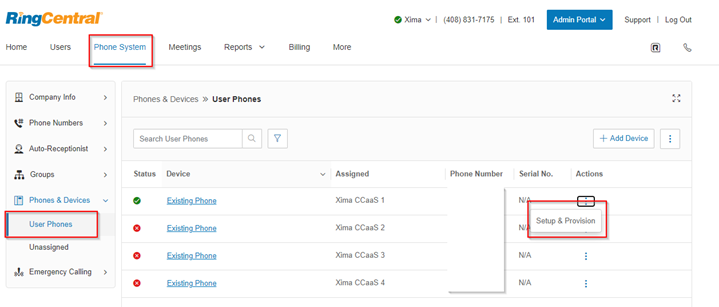
Navigate to
Phone System > Phones & Devices > User Phones -
Select the extension created for CCaaS
-
Select
Setup & Provision > Other Phones > Select -
The SIP Extension, Username, Password, and Authorization ID are listed at the bottom of this view. Note the Outbound Proxy listed here — confirm it matches the region used to authenticate Target Platform
Registering the Extension in CCaaS
- Navigate to
Admin (System) > SIP Extensions - Select
+in eitherInbound ExtensionsorOutbound Extensions - Enter the following fields using the credentials obtained from the UCaaS admin portal:
| Field | Description |
|---|---|
| SIP Extension | The extension number of the UCaaS user account |
| User Name | The SIP username associated with the account |
| Password | The SIP password |
| Authorization ID | The authorization ID for SIP registration |
- Select
Save, thenOKto confirm - Registration typically completes within 30–60 seconds — select
Refreshto update the status display
Reconnect BehaviorAdding or modifying a SIP extension triggers a reconnect of all registered SIP extensions. Schedule changes during off-peak hours when possible.
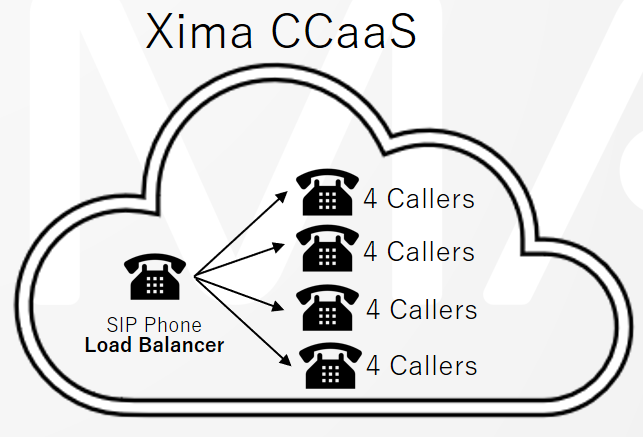
Call CapacityEach extension supports up to four simultaneous Contact Center calls. To support more concurrent calls, additional extensions are required — see the Additional Notes file in this category for the scaling approach.
Primary Extension (Load Balancer)
When multiple SIP extensions are registered for RC/ACO, one is designated as the primary extension — the SIP handset CCaaS uses as the load balancer to distribute calls across the other registered extensions. Use the options menu next to the extension and selectSet as Load Balancer.
Default Primary ExtensionBy default, the first extension registered is treated as the primary extension and appears in bold in the SIP Extensions list.
Updated about 1 month ago