
AI Agent — Lookup
The Lookup step gives an AI Agent spreadsheets of records it looks up exactly, with per-column sharing, per-table verification, and defined answers when a search does not go to plan.
Lookup is the fifth step of the Agent Builder. Lookup tables let an AI Agent find one specific record — a provider, location, order, or account — and read back exactly what is in it. The customer gives a detail, such as a name, account number, or location, and the bot matches it against the table's search keys and answers from that one row. Lookup is optional; left empty it still counts as finished.
Table Changes Go Live Within About 30 SecondsMost changes in the Agent Builder wait until the AI Agent is published. Lookup tables do not: on a live AI Agent, adding, editing, replacing, or deleting a table affects customer conversations almost immediately. Double-check before saving.
Knowledge or LookupWritten policies and FAQs belong in Knowledge, where the bot answers in its own words. Lists where each row is one thing, with the same details for each, belong in Lookup.
Accessing Lookup
Lookup is accessible to accounts with Admin permissions.
- Navigate to
AI Configuration > AI Agent Profilesand select the pencil icon next to an AI Agent - Select
Lookupin the step list; the workspace shows theTableslist above theAdd a tablearea
Adding a Table
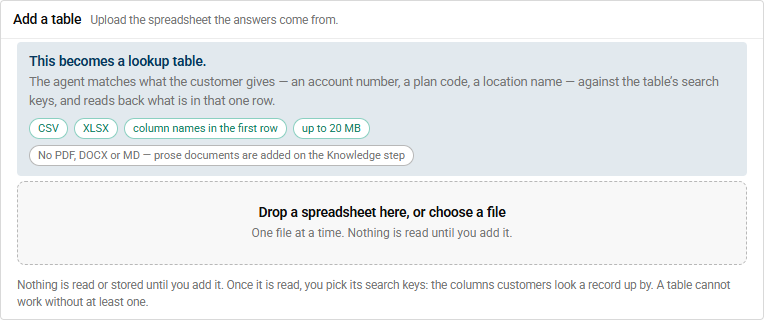
CSV and XLSX files up to 20 MB are accepted, one file at a time, with column names in the first row. PDF, DOCX, and MD files are not accepted here — written documents go on the Knowledge step.
- Drag a spreadsheet onto
Drop a spreadsheet here, or choose a file - Once the file is read, select its search keys — the columns customers look a record up by. A table cannot work without at least one
- Finish setting up the table — see Setting Up a Table
Managing Tables
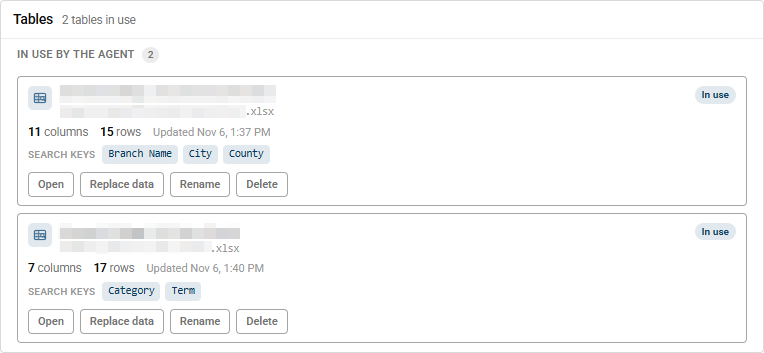
Each table card shows its name, source file, number of columns and rows, when it was last updated, its search keys, and an In use badge if the bot is using it.
| Action | Description |
|---|---|
Open | A read-only view of the table and how the bot will use it — see Read-Only Table View |
Replace data | Uploads a new version of the spreadsheet — for example, after a price list changes |
Rename | Changes the table's display name |
Delete | Removes the table |
Read-Only Table View
Selecting Open shows how the bot will use a table. Nothing on this screen changes what the bot does.
| Section | What It Shows |
|---|---|
What this table is for | The description the bot reads when deciding whether this table holds the answer |
Rows from the file | A sample of rows, to check that each column holds what its label says |
Columns | Each column's meaning, whether it is a search key, whether it is Shareable or Hidden, and what the bot says if it is empty |
What a customer could hear | The verification and sharing settings played out as a sample conversation using one real row |
When the agent uses it | A one-glance summary of matching, verification, discovery, multiple matches, and empty cells |
From this view, Try it on the Test step, Replace data, and Edit this table are available.
Setting Up a Table
Selecting Edit this table opens the editor, which has six sections. Select Save when done, or Cancel to discard changes. A saved change to a table in use goes live within about 30 seconds.
What This Table Is For
| Field | Description |
|---|---|
What it is for | The questions the table answers and what one row represents — for example, "Doctors: each row is one provider, with their specialty, office, address, whether they're taking new patients, and which insurance they accept." |
How the agent asks for what it searches by | The exact words the bot says when it needs the detail to search by, written as one spoken sentence — for example, "What's the name on the account?" or "Can I take the order number? It's on the confirmation email." |
Ask for One Thing at a TimeAsking two questions in one turn is the most common mistake in
How the agent asks for what it searches by.
Columns
Column names and sample values come from the file. Each column has the following settings:
| Setting | Description |
|---|---|
Type | The kind of value, such as Text or Number |
Meaning | What the column means, in plain words — for example, "Whether the provider accepts Medicare". The bot uses this to understand the data |
Shareable / Hidden | Shareable: the bot may tell customers this value. Hidden: the bot never reads it back, whatever the customer asks. Hidden values remain visible in the builder |
Search key | Lets customers look records up by this column |
Read it back as | Optional. How the bot should speak this value |
If it is empty on their record | What the bot says when it finds the record but this detail is blank — for example, "I found that provider, but their listing doesn't say whether they accept Medicare. I can transfer this to someone who can check." |
The builder may also comment on the table as a whole — for example, noting that the table looks like a public list rather than customers' private records. Select Change if the assessment is wrong.
Empty-Cell Lines MatterThe bot never fills a gap from memory: if a cell is empty, it says exactly what is written here. Keep these lines different from the general "can't answer" line in Persona, so a customer with a real record does not think the bot has nothing on file for them.
Search Keys
The columns the bot matches against what the customer says. At least one is required. Matching is exact but tolerant: it ignores capital letters, spaces, and dashes, so AB-123, ab 123, and AB123 all match.
Verification
Whether the bot checks a second detail before sharing or confirming anything. Verification is set per table, not per column.
| Level | What the Bot Does | Right For |
|---|---|---|
No verification needed | Anyone can look the record up | Information a customer could read on a website, such as locations, providers, or services |
Verify before sharing details | Confirms it found a record, then asks for a second detail (a chosen column) before reading anything from it | Account data, where being a customer is not itself private |
Verify before confirming anything | Asks for the second detail before saying whether it found a record at all, and answers the same way either way | Lists where being on the list is itself private, such as patients, members, or cases |
Why the Strictest Level Asks Even With No MatchIf the bot asked for a second detail only when it found someone, the question itself would reveal that the person is on the list.
Behaviour
What the bot says when a search does not go to plan. The bot never invents a value, so every case has a defined answer.
| Situation | What to Write | Example |
|---|---|---|
When several records match | A question that narrows it down. The bot never guesses between records | "There's more than one order under that name. Is the order number handy?" |
When verification fails | The exact words to use when the second detail does not match. Nothing from the record is shared until the check passes | "That doesn't match the details on file. I can transfer this to someone who can check it." |
Discovery Questions
Whether the table also answers general questions across many rows, where the customer does not name a specific record — for example, "Which clinics are open on Saturdays?"
| Option | Description |
|---|---|
Not answered yet | No decision made. Until one is, the bot uses the table for record lookups only, and the builder raises the question again the next time the table is opened |
Yes, use it for discovery | The bot may summarize across rows |
No, record lookups only | The bot never summarizes across rows, even when asked |
Keep Discovery Off for Private RecordsOnly turn discovery on for tables where it is acceptable for any customer to hear about many rows at once.
Checklist
- Every table has at least one search key and a clear
What it is fordescription - Private columns are set to
Hidden - The verification level fits how private each table's records are
- Empty-cell lines and Behaviour messages are written and offer a next step
- Discovery questions are decided for each table
Updated about 3 hours ago