
Recording Modes and Options
Recording Modes and Options control how calls are captured for an agent and what recording access is granted within CC-Agent Client.
Recording configuration is applied at the agent level and determines whether calls are recorded automatically or manually, whether the agent can control recording during a call, and whether the agent can review recordings from their own calls, from shared skill queues, or from other agents in their assigned role.
WebRTC Agents OnlyRecording modes apply only to agents using WebRTC extensions built in CCaaS. Agents using UC phones do not have recording controls within Xima — recording rules for those agents are managed within the UCaaS platform. Recording review access (own, skill, and role recordings) applies to both WebRTC and UC agents.
Recording Mode
Recording Mode determines whether calls are recorded automatically and whether the agent has access to recording controls during a call.
| Recording Mode | Records Calls Automatically | Agent Recording Controls |
|---|---|---|
Automatic | Yes | Yes |
Automatic (Pausing Prohibited) | Yes | No |
Manual | No | Yes |
Disabled | No | No |
Configuring Recording Mode
- Navigate to
User Management > Agent Licensing - Locate the agent and click the ellipsis next to their name, then select
Edit - Scroll to the
Recording Modefield and select the applicable mode - Click
Save
NoteIf the ellipsis does not appear next to an agent's name, the agent is likely provisioned through a UC platform and recording rules must be managed within that UCaaS system.
Recording Review Access
Recording review access controls whether an agent can listen to call recordings from within CC-Agent Client. Access can be granted for the agent's own recordings, recordings from shared skill queues, recordings from other agents in their assigned role, and download permissions for the first two.
Own Call Recordings
When enabled, agents can access recordings of their own calls from the history view in CC-Agent Client.
To enable:
-
Navigate to
User Management > Agent LicensingorUser Management > UC Phone Licensing, depending on where the agent resides -
Click the ellipsis next to the agent's name and select
Edit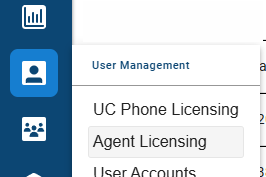
-
Enable
Allow agent to review their own call recordings
-
Optionally, enable
Agent may download their own recordingsto allow the agent to download their own call recordings -
Click
Save
Bulk EditingTo apply recording review access to multiple agents at once, select the checkbox to the left of each agent's name in the list view, then click the
Bulk Editbutton. Enable the applicable recording access options and save.
Skill Call Recordings
When enabled, agents can review recordings from any call within their assigned skill queues — including calls they were not personally a part of.
Elevated AccessSkill recording access grants the agent visibility into all call recordings for their assigned skill queues. This permission is typically held by Supervisors and Managers. Enable only if agents are explicitly authorized to review queue-level call history.
To enable:
-
Navigate to the agent in
Agent LicensingorUC Phone Licensing -
Click the ellipsis next to the agent's name and select
Edit, or select multiple agents for bulk editing -
Enable
Allow agent to review skill call recordings
-
Optionally, enable
Agent may download skill call recordingsto allow the agent to download recordings and create downloadable snippets from shared skill queues -
Click
Save
Role Call Recordings
When enabled, agents can review recordings for calls handled by other agents in their assigned Role, including calls that are not tied to a skill queue — such as a personal or direct call a skill-level grant would not otherwise cover.
Contact Xima Support to EnableContact Xima Support to have this enabled before the option appears in Agent Licensing.
AGENT_ACCESS_RECORDINGS_BY_ROLE
Elevated AccessRole recording access grants the agent visibility into every call recording for the agents in their assigned role, regardless of skill. This permission is typically held by Supervisors and Managers. Enable only if agents are explicitly authorized to review recordings across their role.
To enable, once the hidden setting above has been turned on:
-
Navigate to the agent in
Agent LicensingorUC Phone Licensing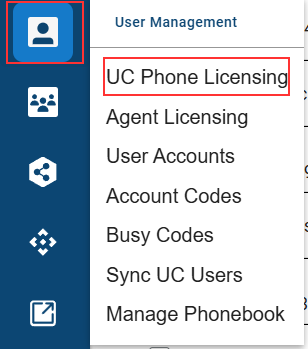
-
Click the ellipsis next to the agent's name and select
Edit, or select multiple agents for bulk editing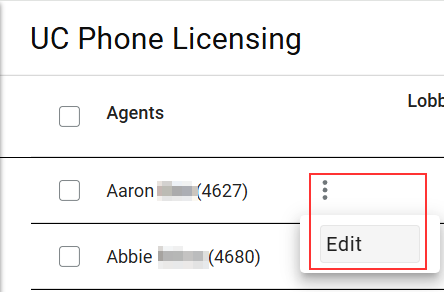
-
Enable
Allow agent to review role recordings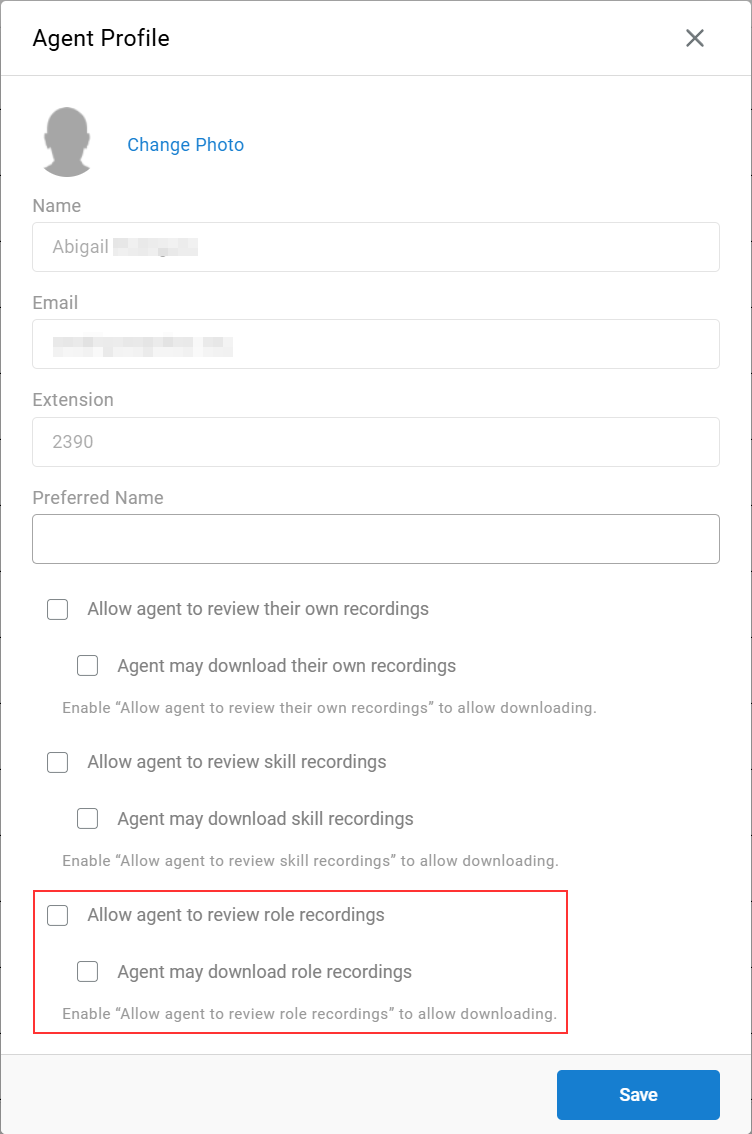
-
Click
Save
Requires a Role AssignmentRole call recording access has no effect until the agent is assigned to a Role. Without a role assignment, there are no other agents' recordings to review.
Updated about 2 months ago