
AI Agent — Persona
The Persona step sets who an AI Agent is and what it is for — its name, intent, audience, voice and tone, and the boundaries it must follow.
Persona is the first step in the Agent Builder and the foundation for everything the AI Agent does. It describes who the bot is, what it is for, who it talks to, how it should sound, and the rules it must follow. Every later step builds on what is written here.
Accessing Persona
Persona is accessible to accounts with Admin permissions.
- Navigate to
AI Configuration > AI Agent Profilesand select the pencil icon next to an AI Agent or create a new AI Agent - The Agent Builder opens on the
Personastep, withIdentity,Voice and tone, andBoundariestabs across the top of the workspace
Persona Sections

| Section | What It Sets | Required |
|---|---|---|
| Identity | Bot name, intent, and audience | The intent is required — it is the only thing this step needs |
| Voice and Tone | Speaking style and answer length | No. The bot has a workable default voice |
| Boundaries | Must do, must not do, and the "can't answer" line | No, but strongly recommended |
When all three sections are filled in, the step list shows Persona: All three sections set. When only the intent is filled in, it shows Intent set. Either way the step is complete.
Identity
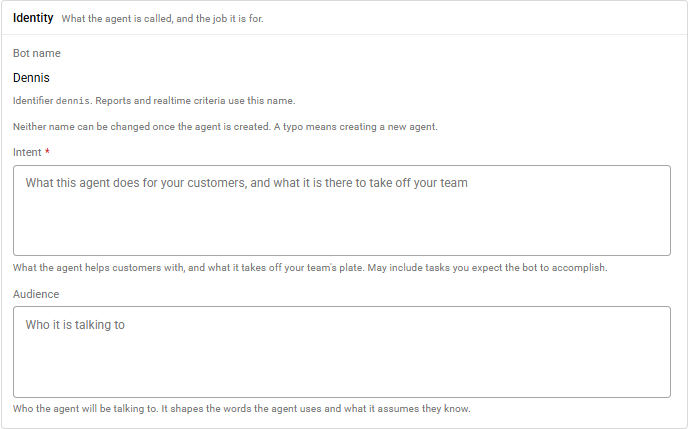
| Field | Description |
|---|---|
Bot name | The name customers see when they talk to the bot — for example, Ava or the Riverside Clinic Assistant |
Intent | Required. The bot's job description — see Intent |
Audience | Who the bot talks to, in a few words — for example, Medical patients or Existing business customers. Helps the bot pitch its language and assumptions correctly |
The Bot Name Cannot Be ChangedThe bot name cannot be changed after the AI Agent is created, and neither can the AI Agent Name. To correct a typo, create a new AI Agent.
Intent
The intent is written the way a new team member would be briefed on their first day:
- Who contacts the business, and on which channels
- What they usually need
- What the bot should get done for them
| Example | Intent |
|---|---|
| Weak | Help customers. |
| Strong | Assist patients who call or message the clinic. Answer questions about the doctors, services, locations, and opening hours. Help patients book, change, or cancel appointments. If a patient has a billing question, take their details and transfer them to the billing team. |
The more specific the intent, the better the bot stays on task. Anything the intent mentions — such as booking appointments or looking up an account — needs a way for the bot to do it, provided by Knowledge and Lookup, Integrations, or Transfers.
Voice and Tone
This section is optional. If it is skipped, the bot uses a sensible default voice.
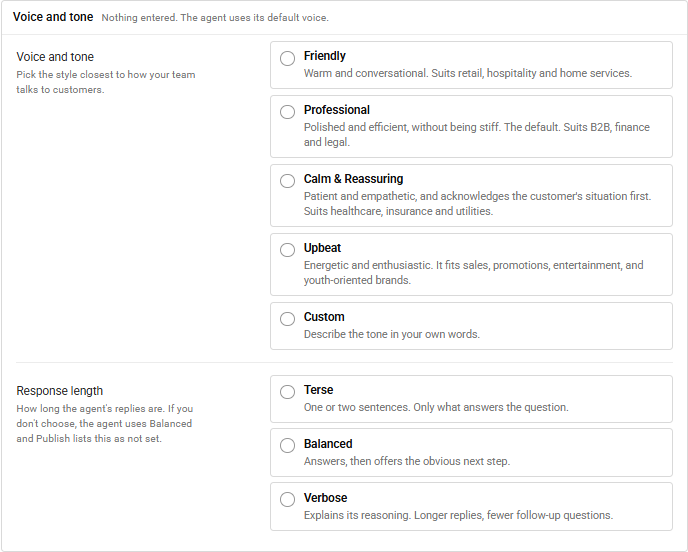
| Field | Description |
|---|---|
Voice and tone | The speaking style — see Style |
Response length | How long answers are — see Response Length |
Style
| Style | How It Sounds | Good Fit For |
|---|---|---|
Friendly | Warm and conversational, with contractions and a light, personable touch | Retail, hospitality, home services, general small business |
Professional | Polished, courteous, and efficient, without being stiff | B2B, financial services, legal, most corporate lines. The safe default |
Calm & Reassuring | Patient, empathetic, and a little slower. Acknowledges the customer's situation before moving on | Healthcare, insurance claims, utilities, any line where callers are often stressed |
Upbeat | Energetic and enthusiastic | Sales, promotions, entertainment, youth-oriented brands |
Custom | A custom style, for when none of the above fits | Brands with a distinctive voice |
Response Length
| Length | What the Bot Does | Trade-Off |
|---|---|---|
Terse | One or two sentences, using the fewest words that answer the question | Quick, but can feel abrupt |
Balanced | Answers, then offers the obvious next step | A good middle ground for most bots |
Verbose | Explains its reasoning | Longer conversations, but fewer follow-up questions |
Shorter Answers on CallsFor a bot that answers phone calls,
TerseorBalancedusually works best. Long spoken answers are hard for callers to follow.
Boundaries
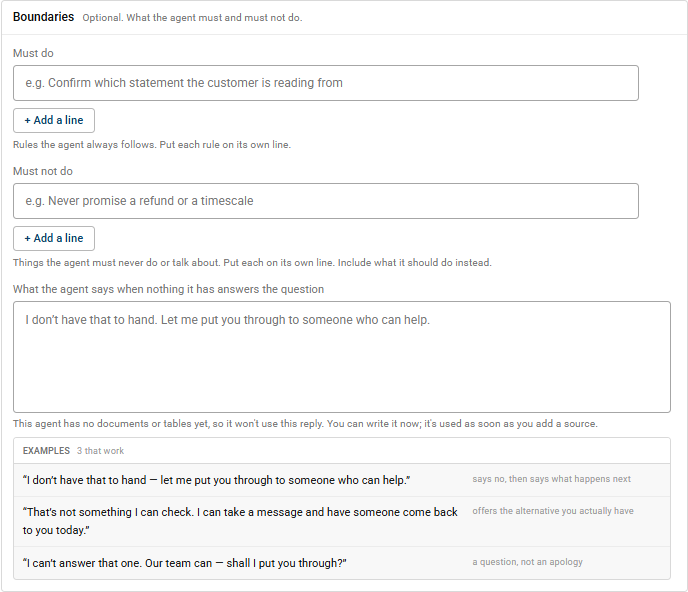
Boundaries are firm rules the bot always follows. The section header counts them — for example, 1 must-do · 3 must-not-do.
| Field | Description |
|---|---|
Must do | Things the bot should always do. Select + Add a line for each rule, one rule per line; the × removes a rule |
Must not do | Things the bot should never do. Works best when each rule also says what the bot should do instead, so the customer is not left at a dead end |
| What the agent says when nothing it has answers the question | The line the bot uses when a customer asks something it has no information about — see The "Can't Answer" Line |
Use CaseExamples of boundary rules:
- Must do: Confirm the date, time, and location back to the customer before booking an appointment
- Must do: Ask for the customer's account number before discussing an order
- Must not do: Never give a medical diagnosis. Instead, explain that a diagnosis cannot be provided and offer to book an appointment
- Must not do: Never handle emergencies. Instead, tell the customer to hang up and dial 911
- Must not do: Do not go in circles. If the appointment cannot be booked after two tries, transfer to a person
The "Can't Answer" Line
This line is said once, whatever the customer asked about, so it should stay general and say what happens next. Until a custom line is written, customers hear I can't answer that one — is there something else I can help with?
The builder suggests three patterns that work well:
| Pattern | Why It Works |
|---|---|
| Says no, then says what happens next | The customer knows the conversation is moving forward — for example, a line that offers to connect them with someone who can help |
| Offers an alternative the business actually has | For example, taking a message and having someone call back the same day |
| Asks a question instead of apologizing | For example, offering to transfer the customer to the team that can answer |
Keep This Line Different From Lookup MessagesLookup tables have their own message for when a detail is empty — see Knowledge and Lookup. If both say the same thing, a customer with a real record could think the bot has nothing on file for them.
Only Promise What the Bot Can DoIf the line offers a transfer, at least one destination must be set up in Transfers.
Writing an Effective Persona
- Be specific about scope. State what is in bounds and what is out. A bot that knows what it should not handle hands those conversations off cleanly
- State what to collect first. If the bot needs a name, account number, or postcode before it can help, say so in the intent or in a
Must dorule - Avoid contradictions. For example, "Always transfer billing questions" and "Never transfer before trying to help" pull in opposite directions — pick one, or say which wins
- Do not ask for things the bot cannot do. If the intent says "book appointments" but no booking system is connected, the bot cannot follow through. The builder flags capabilities like this so the missing piece can be added or the request removed
- Use plain language. Rules are written the way they would be said to a colleague; no special formatting or codes are needed
When the AI Agent is published, the builder reviews the persona alongside everything else and points out anything contradictory, or anything that asks the bot to do something it has not been given a way to do.
Changing the Persona on a Live AI Agent
The persona can be edited at any time. Changes are saved as they are entered but are not live until the AI Agent is published again. The header shows how many changes are waiting — for example, 1 change not live yet — and customers keep talking to the published version in the meantime.
Updated about 3 hours ago