
SBC — Guidelines
Explains how CCaaS connects to a customer's voice environment through Xima's hosted SBC, what information is collected before setup, and which network, routing, and troubleshooting considerations apply.
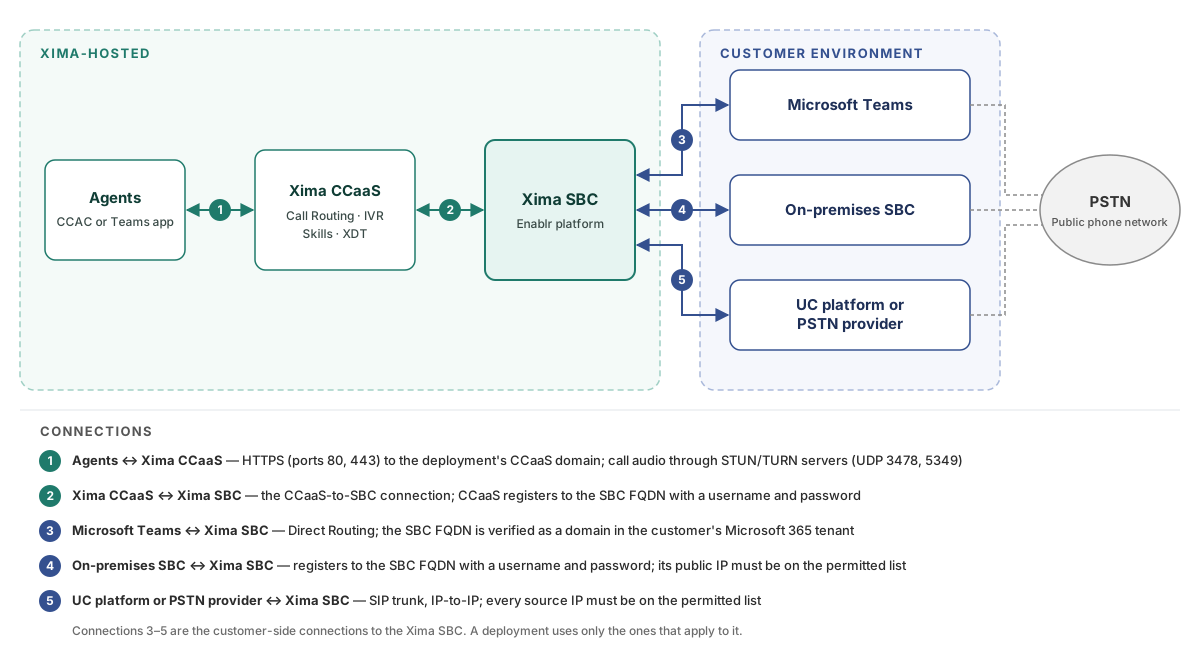
Some deployments connect CCaaS to the customer's voice environment through a session border controller (SBC) hosted on Xima's side, on the Enablr platform, rather than registering directly to a UC platform. The Xima SBC sits between CCaaS and every other voice system in the deployment, such as Microsoft Teams, an on-premises SBC, or a UC platform or SIP trunk provider that supplies PSTN access. Each connection to the Xima SBC is built as a separate leg, and each must be in place for calls to flow.
Customer-Side EquipmentXima configures the Xima SBC and the CCaaS side of the connection. Xima Support does not set up or manage a customer's own SBC, PBX, UC platform, or Microsoft 365 tenant.
How the Connection Is Structured
| Connection | How It Connects |
|---|---|
| CCaaS to the Xima SBC | CCaaS registers to the Xima SBC as a SIP extension, using an FQDN assigned to the deployment (for example, customername.xima.enablr.cloud) and a username and password provided by Xima |
| Microsoft Teams to the Xima SBC | Microsoft Teams connects through Direct Routing; the SBC FQDN is verified as a domain in the customer's Microsoft 365 tenant, and the resulting TXT record values are entered on the Xima SBC to authenticate the connection — see Direct Routing Configuration |
| A customer's on-premises SBC to the Xima SBC | The customer's SBC registers to the deployment's Xima SBC FQDN with user authentication, using a username and password provided in the IPs and Ports document; the SBC's public IP must also be on the Xima SBC's permitted list |
| A UC platform or PSTN provider to the Xima SBC | A SIP trunk is created on the UC platform or provider side and pointed at the Xima SBC as an IP-to-IP connection; the Xima SBC accepts traffic only from IP addresses on its permitted list |
IP Addresses Are Required, Not SRV RecordsA SIP trunk from a UC platform or PSTN provider to the Xima SBC is configured as an IP-to-IP connection. Some UC platforms and SIP providers send traffic from several SIP proxies, so every IP address that traffic may come from must be provided. Calls from an IP address that is not on the Xima SBC's permitted list are blocked, which can make some calls connect and others fail.
Information Collected Before Setup
Before an SBC deployment is built, Xima shares an IPs and Ports document with the customer and any partner involved. The customer and partner fill it in so Xima can build the SIP trunk on the Xima SBC. The document itself does not contain configuration steps for the customer's own SBC or UC platform.
| Information | Description |
|---|---|
| Public IP addresses | Every public IP address that SIP traffic may come from, including one or more per office for multi-site deployments |
| UC or PSTN provider IP addresses | The IP address and domain of any UC platform or SIP trunk provider connected to the Xima SBC, plus any additional IP addresses its SIP proxies may use |
| CCaaS extension ranges | The extension ranges assigned to CCaaS agents and skills |
| Existing extension ranges | Current extension and hunt group ranges on Microsoft Teams or the UC platform, used to build the SBC dial plan |
| DIDs | The phone numbers to be sent to CCaaS, and which agents or skills each maps to |
| PSTN path | Which connection carries outbound calls to the public phone network |
| Simultaneous sessions | The number of concurrent calls the SBC connection must support |
The document has two tabs. The IPs and Ports tab covers connectivity, and the SBC Routing tab covers the dial plan the SBC uses to route calls.
Network and Firewall Requirements
The customer's network must allow the following traffic. On the Xima side, the customer's SBC or network public IP is added to the Xima SBC's permitted list.
| Traffic | Direction | Protocol and Ports | Notes |
|---|---|---|---|
| SIP signaling | To and from Xima's public IP | 5060 (TCP), or 5061 for TLS | Xima's public IP is the static egress IP of the CCaaS cluster the deployment runs on, listed in the deployment's IPs and Ports document; RTP media comes from this same IP, and there are no separate RTP servers |
| CCaaS web portal and web phone | To the deployment's CCaaS domain (for example, customername.xima.cloud) | HTTP and HTTPS, ports 80 and 443 | Agents' browsers connect to this domain; the network must be able to reach the IP address it resolves to |
| STUN/TURN servers | From every server listed below | UDP 3478 and 5349 | Used for media |
| Peer-to-peer connections | Per the IPs and Ports document | UDP 1024–65535 | |
| RTP media | Per the IPs and Ports document | 1024–65535 |
STUN/TURN Servers
| Region | IP Addresses |
|---|---|
| US Central | 35.194.4.248, 35.232.87.208, 35.222.193.155, 34.55.59.170, 34.56.112.203 |
| US East | 34.75.175.19, 34.139.124.84, 34.74.118.248 |
| US West | 34.106.80.147, 34.106.102.183 |
| Australia | 34.151.88.134, 35.201.16.6, 35.244.125.23 |
| Europe | 34.147.40.252, 35.204.226.28, 34.141.231.205 |
Allow Every Listed AddressEach CCaaS cluster prioritizes the STUN/TURN servers in its own region but also uses servers in other regions, and Xima load-balances across data centers throughout the day. Every address in the table should be allowed, not only those in the deployment's region.
Signaling and Security
SIP signaling can use TCP or TLS. The choice of transport is made with Xima during setup. SRTP is supported for encrypted media.
Both CCaaS and a customer's on-premises SBC register to the Xima SBC using the deployment's FQDN, such as customername.xima.enablr.cloud, and authenticate with a username and password.
Call Routing Through the SBC
Inbound Calls
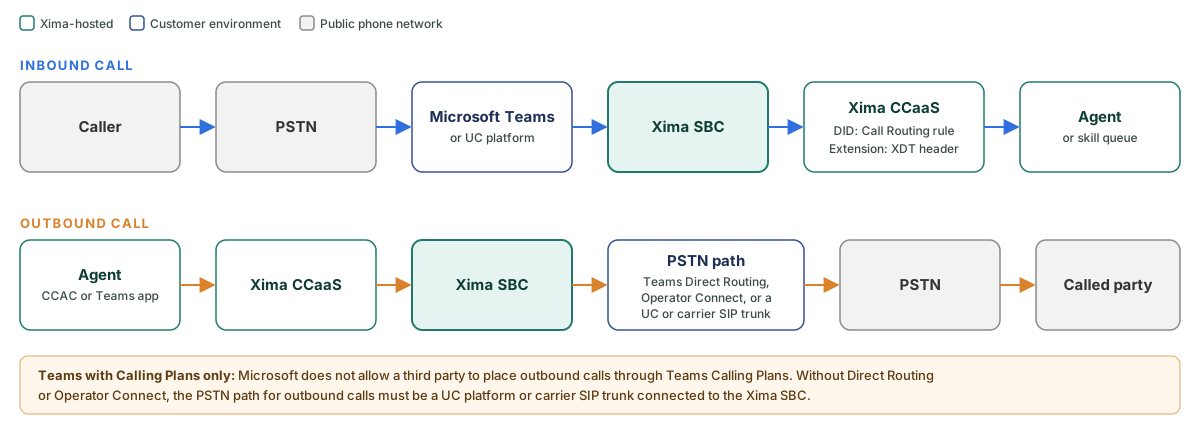
A call to a DID reaches Microsoft Teams or the UC platform first, which passes it to the Xima SBC. The Xima SBC forwards the full 10-digit number to CCaaS, where a Call Routing rule must exist for that number to reach the intended IVR or skill.
Calls dialed as short extensions within a range defined in the SBC dial plan are forwarded as dialed. The Xima SBC adds an X-XDT-Agent or X-XDT-Skill SIP header, based on which range the extension falls in, so the call reaches the intended agent or skill without a Call Routing rule in CCaaS — see XDT Routing.
Routing Handled Before CCaaSTime-of-day, holiday, or other routing decisions can be handled in Microsoft Teams or the UC platform before a call is sent to CCaaS. Only calls that reach CCaaS appear in CCaaS reporting.
Outbound Calls
Outbound calls placed by CCaaS agents, from either CCAC or the embedded Teams app, go from CCaaS to the Xima SBC. The SBC dial plan then sends them to whichever connection provides PSTN access. Numbers of 11 or more digits, such as +1 801 930 1800, are typically sent with all digits.
Microsoft Teams Without Direct Routing or Operator ConnectMicrosoft does not allow a third party to place outbound PSTN calls through Teams Calling Plans. If the Teams tenant has neither Direct Routing nor Operator Connect, outbound calls need a separate PSTN path, such as a SIP trunk from a UC platform or carrier connected to the Xima SBC.
Microsoft Teams Transfer Considerations
When a Teams user transfers a call by selecting a person's name from the Teams directory, Teams completes it as an internal Teams call. That call bypasses the SBC, and CCaaS loses track of it.
To transfer calls into the contact center reliably, skills and hunt groups should be given dialable extensions, and transfers should be made by dialing the extension or full number rather than selecting a name.
Troubleshooting
When calls through an SBC deployment fail, the following checks narrow down which leg of the connection is affected.
- Navigate to
Admin (System) > SIP Extensionsand confirm the SBC extension shows as registered — see SIP Extensions - Place a test call to a DID routed to CCaaS
- Check whether the call appears in Cradle to Grave or in the queue in Supervisor View
| Result | Likely Location of the Problem |
|---|---|
| The extension is not registered | The CCaaS-to-SBC connection; Xima Support can confirm the registration |
| The extension is registered, but the test call does not appear in CCaaS at all (for example, the caller hears a busy signal) | The connection between the customer's network or UC platform and the Xima SBC; check that the source IP addresses are on the SBC's permitted list and that the customer-side SIP trunk is up |
| The test call reaches CCaaS but routes incorrectly | CCaaS configuration, such as Call Routing rules, IVRs, or skills |
Updated 2 days ago