
Web Service Integration — Salesforce Flows
Configures a Web Service Integration Profile that triggers a Salesforce Flow from a CCaaS call event.
Triggering a Salesforce Flow from CCaaS requires configuration on both sides — a dedicated integration user and Connected App in Salesforce, and a Web Service Integration Profile in CCaaS.
Configuring Salesforce
Create the Integration User
- Set the
User LicensetoSalesforce Integration - Set the
ProfiletoSalesforce API Only System Integrations - Enable the
Flow Usercheckbox
Create a Connected App
- Enable OAuth Settings
- Enable for Device Flow
- Enable the appropriate OAuth Scopes (Full Access is sufficient for testing)
- Enable Token Exchange Flow
- Set the
Permitted UsersOAuth policy toAll users may self-authorize - Set the
IP RelaxationOAuth policy toRelax IP restrictions
Build the Flow
Build the target flow and mark its input variables as available for input.
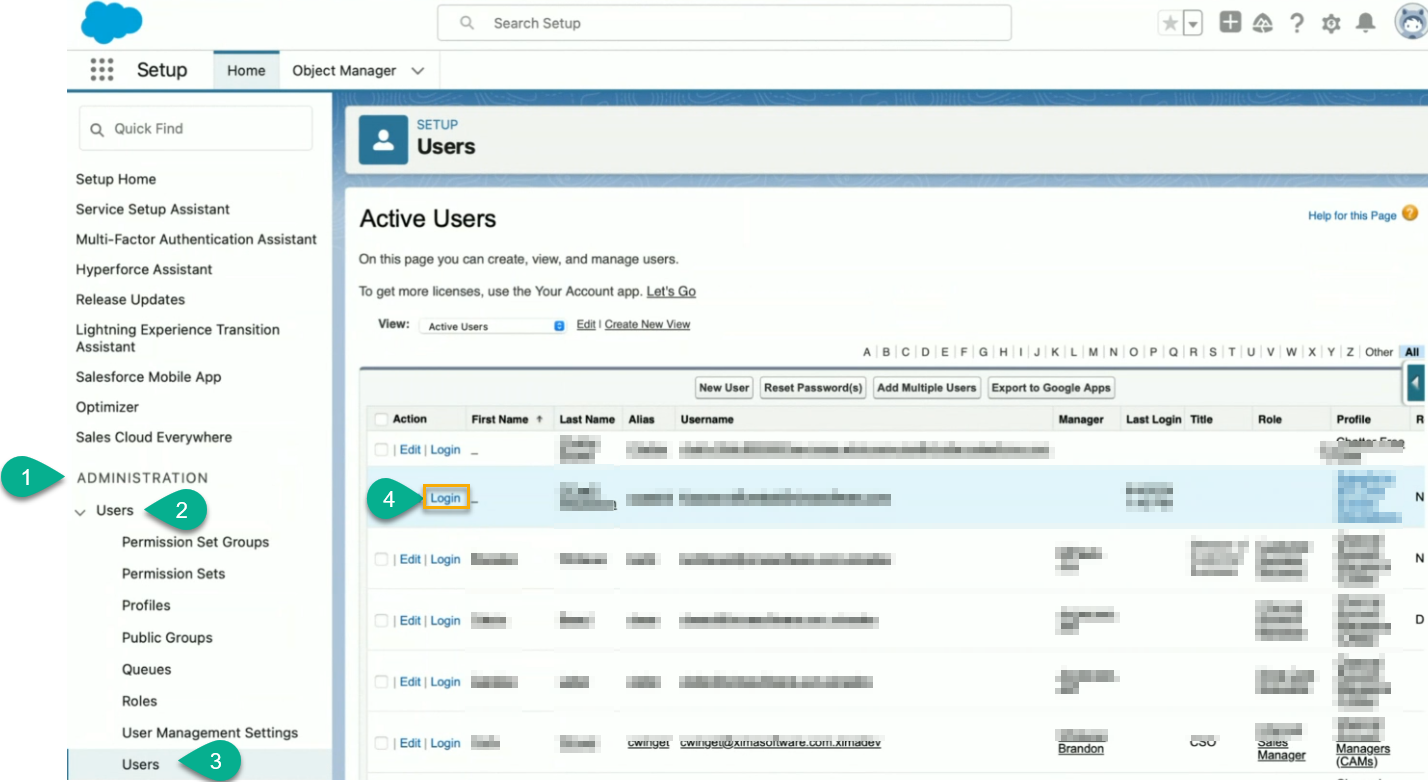
Collect the Security Token
The token is not displayed on the integration user's profile — it must be reset, which sends it to the user's assigned email address.
- In the Salesforce Admin portal, open
Usersunder Administration - Log in as the integration user
- Select
My Settings > Personal > Reset My Security Token - Retrieve the token from the emailed notification
Configuring the Web-Service Integration Profile
-
Create a new profile under WebService Integration
-
Set the
Target URLto the Salesforce flow's endpoint, for example:https://<org>.my.salesforce.com/services/data/v59.0/actions/custom/flow/<flow_api_name> -
Set
HTTP MethodtoPOST -
Configure
Triggering Call Criteriato match the calls that should trigger the flow (e.g., calls that include a specific skill) -
Configure
Form Parameterswith parameter names matching the flow's expected input variables exactly -
Configure the four Salesforce Parameters rows (see table below)
-
Set
Triggering Eventto the point in the call when the flow should fire (e.g.,Call is Connected) -
Click
Save
Salesforce Parameters
Four rows are required, using these exact names:
| Name | Value |
|---|---|
username | The Salesforce integration user's username. |
password | The integration user's Salesforce password immediately followed by the security token, with no space between them. |
clientId | The Connected App's Consumer Key. |
clientSecret | The Connected App's Consumer Secret. |
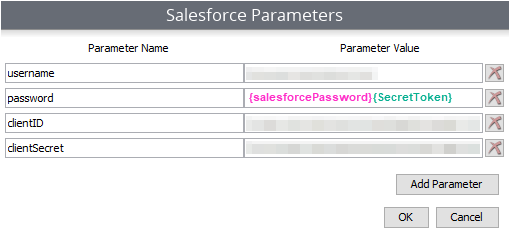
Once the Triggering Call Criteria and Triggering Event conditions are met, the configured Salesforce Parameters are sent to the flow specified in the Target URL.
Updated 3 months ago