
Standard Triggers
Standard Triggers are built-in alerts for emergency calls and agent license shortages, turned on by adding email or CCAC desktop alert recipients.
Standard Triggers are built into CCaaS — the event each one watches for is fixed, and only who is notified is configured. Adding email addresses or desktop recipients turns a trigger on; a trigger with no recipients sends nothing. See Alerts and Triggers for how alerts are delivered.
Accessing Standard Triggers
Standard Triggers are accessible to accounts with Admin permissions.
- Navigate to
Admin (System) > Alerts and Triggers - The
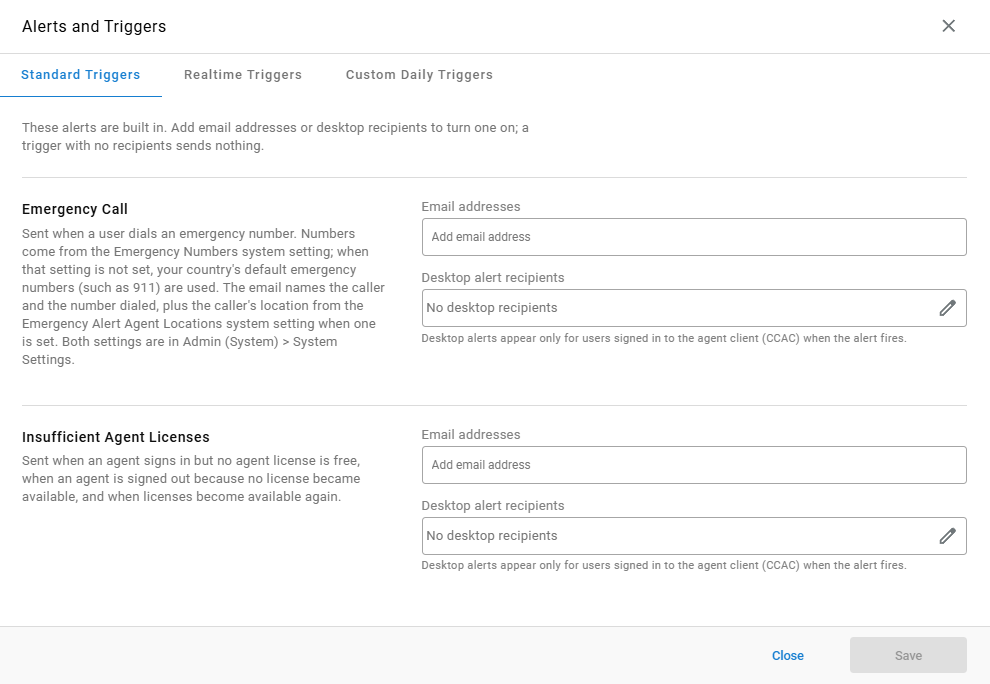
Standard Triggerstab lists each built-in trigger with its recipient fields
Available Triggers
| Trigger | Description |
|---|---|
Emergency Call | Sent when a user dials an emergency number. Numbers come from the Emergency Numbers system setting; when that setting is not set, the country's default emergency numbers (such as 911) are used. The email names the caller and the number dialed, plus the caller's location from the Emergency Alert Agent Locations system setting when one is set. Both settings are in Admin (System) > System Settings — see Emergency Call Notifications |
Insufficient Agent Licenses | Sent when an agent signs in but no agent license is free, when an agent is signed out because no license became available, and when licenses become available again |
Configuring a Standard Trigger
- Select the
Standard Triggerstab - Complete the following fields for each trigger to turn on:
| Field | Description |
|---|---|
Email addresses | The addresses notified by email when the trigger fires |
Desktop alert recipients | The users who receive a desktop alert in CCAC. Select the pencil icon to choose recipients |
- Select
Save
Updated about 8 hours ago