
Outbound Numbers
Outbound Numbers are caller ID numbers with no registered extension behind them, presented on outbound calls placed through any available extension.
An outbound number is a caller ID an agent can present on an outbound call without a dedicated SIP extension. The call goes out through any available extension while presenting the chosen number. Like an outbound extension, an outbound number can be assigned to a skill or an agent and pinned to the top of their list.
Accessing Outbound Numbers
Outbound Numbers is accessible to accounts with Admin permissions.
- Navigate to
Admin (System) > SIP Extensions - All outbound numbers are listed under
Outbound Numbers, with the skill or agent each is assigned to; when none exist,No outbound numbers configured yet.is shown
Adding an Outbound Number
- Select the
+icon in theOutbound Numbersheader - Complete the following fields in the
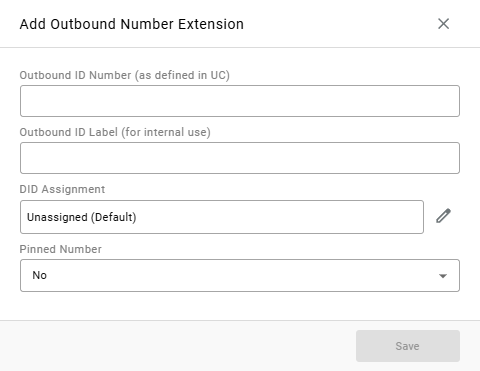
Add Outbound Number Extensionwindow:
| Field | Description |
|---|---|
Outbound ID Number (as defined in UC) | The caller ID number, as configured on the phone system |
Outbound ID Label (for internal use) | A name for the caller ID, shown to agents when they choose a number |
DID Assignment | Who is offered this caller ID. Defaults to Unassigned (Default). Select the pencil icon to assign it to one skill or one agent |
Pinned Number | Yes keeps this caller ID at the top of the assigned agents' list in CCAC. Defaults to No |
- Select
Save
When a number is removed, agents are no longer offered it, and a call attempted with it is refused.
Updated about 17 hours ago