
IVR — Call Routing Methods
Common patterns for directing a call to a specific destination based on how it arrived, using conditions in the Primary IVR.
Every call presented to CCaaS routes to whichever IVR is set as Primary. From there, Parameter conditions inside the Primary IVR can redirect specific calls to a dedicated IVR, skill, agent, or dialable number before the caller ever hears a prompt. This page walks through the most common pattern — routing by the number dialed — and how to migrate routing rules out of the legacy Call Routing menu.
By Dialed Number
Routing by dialed number lets a single Primary IVR send calls to different destinations depending on which number the caller dialed, without building a separate IVR entry point for every number.
- Identify what part of the call is unique to the number dialed. This is not always available as the
DNISStandard Parameter — coverage depends on whether the carrier or UC platform supplies it. See Parameters for where else this value tends to appear, most often in theTOorFROMSIP Header field as the dialed number itself, an extension domain, or a prefix added by the UC platform - Add a
Parametercondition in the Primary IVR, using the identifiedStandard ParameterorSIP Headervalue and an operator that matches it —CONTAINSis typical when the unique value is a prefix rather than an exact match - Add a
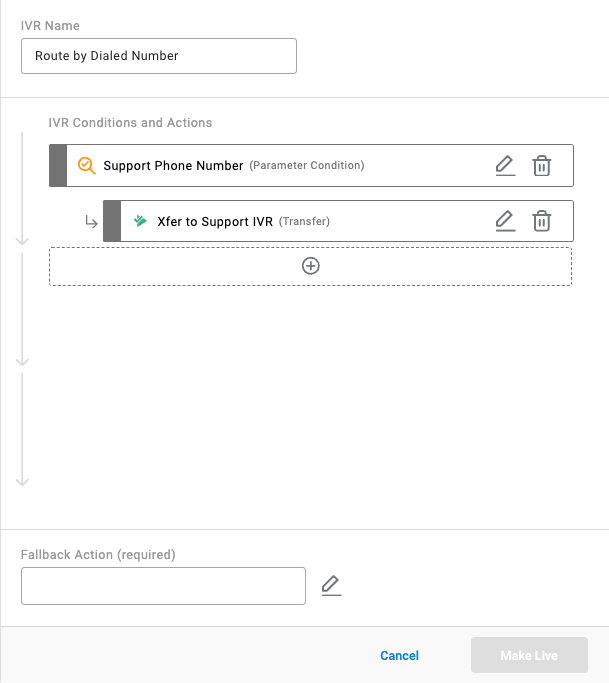
Transfersub-action to the condition for when it is met, targeting the IVR, skill, agent, or dialable number the call should reach - Repeat with additional Parameter conditions below it for each other number that needs distinct handling — a call that does not match one condition falls through to the next
Example
A number is configured by the UC platform to always add a support/ prefix to the FROM header when dialed.
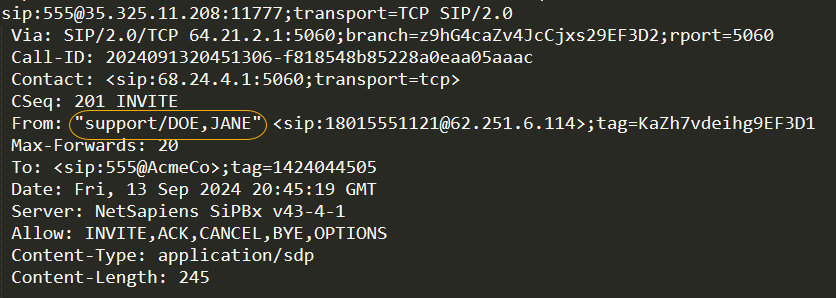
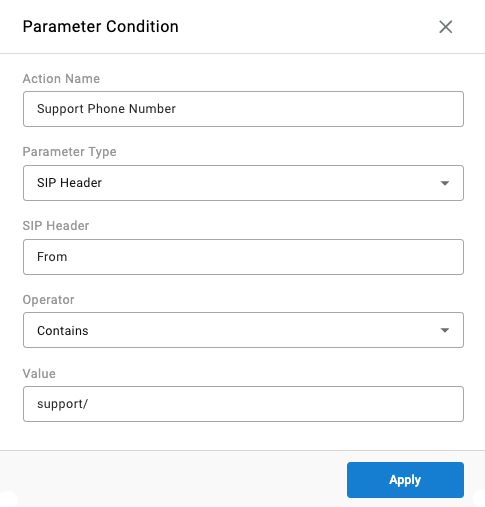
A Parameter condition using SIP Header, header FROM, operator CONTAINS, value support/ catches this, with a Transfer to IVR sub-action targeting a dedicated Support IVR when met.
Migrating from the Legacy Call Routing Menu
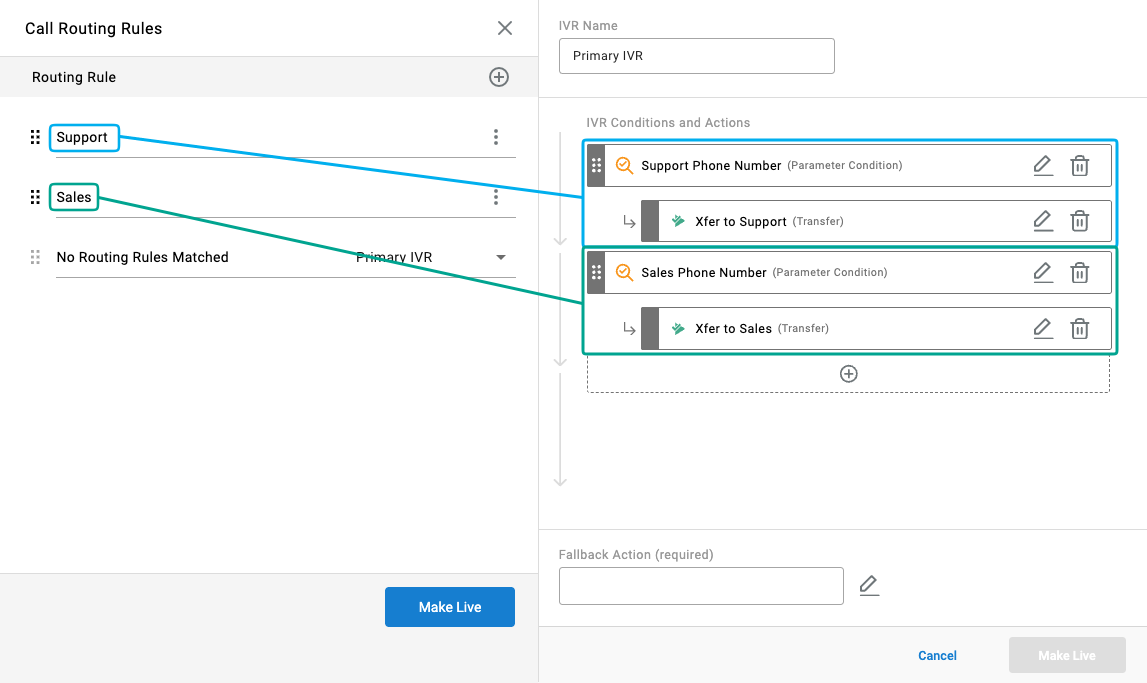
Accounts configured before the Primary IVR's Parameter condition became available may still have a standalone Routing Configuration > Call Routing menu, where dialed-number-style rules were defined using SIP Header matching against Agent, Skill, or Dialable Number destinations. This menu remains available as long as rules exist in it, but it is best practice to move dialed-number routing rules into the Primary IVR for improved logging.
- Open each existing rule in the Call Routing menu and note its SIP Header, matching operator, value, and destination
- Recreate each rule as a Parameter condition in the Primary IVR, following the steps in By Dialed Number
- Once every rule has been recreated in the Primary IVR, delete the corresponding rules from the Call Routing menu
- Set the menu's
No Routing Rules Matcheddestination toPrimary IVR - Select
Make Live
Once all rules are removed, the Call Routing menu no longer appears in navigation.
Does Not Apply to External Skill Routing Identifier MatchingThe Call Routing menu is also used to match a Skill Routing Identifier supplied by an external UC platform to a CCaaS skill — see Call Routing in CCaaS. That use case is unrelated to dialed-number routing and is not being deprecated; the migration guidance above applies only to rules that route by dialed number, which the Primary IVR's Parameter condition now handles natively.
Updated 2 months ago