
Provisioning a Yealink Phone
Adds a Yealink device to a user's extension in the Xima UCaaS Admin Portal and auto-provisions it from the phone's own web interface.
A Yealink phone is added to a user's extension in the Xima UCaaS Admin Portal, then auto-provisioned from its own web interface.
Example ModelThese steps were captured on a Yealink T42S. Other Yealink models follow a very similar process.
Adding the Device in the Admin Portal
-
Select
Usersin the Xima UCaaS Admin Portal
-
Select the user the phone should belong to
-
Select the
Phonestab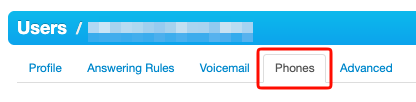
-
Select
Add Phone -
Complete the following fields:
| Field | Description |
|---|---|
| Suffix | A letter identifying this specific phone on the extension; each phone assigned to the same extension needs a unique suffix |
| Emergency Caller ID | The number forwarded to emergency services if this phone places an emergency call |
| Model | The Yealink model being added |
| Emergency Address | |
| MAC Address | Found on the back of the device, sometimes labeled MAC or Serial Key |
| Line Number | The line the phone should register on |
The phone now appears listed under the user.
Auto-Provisioning the Device
-
On the phone itself, find its local IP address (commonly under
Menu > Status > IPV4, though this varies by model) -
Browse to that IP address to reach the Yealink login screen
-
Log in with the default credentials, username
adminand passwordadmin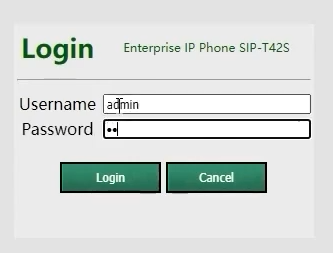
-
Select the
Settingstab, thenAuto Provision -
Enter the auto-provisioning URL for the deployment
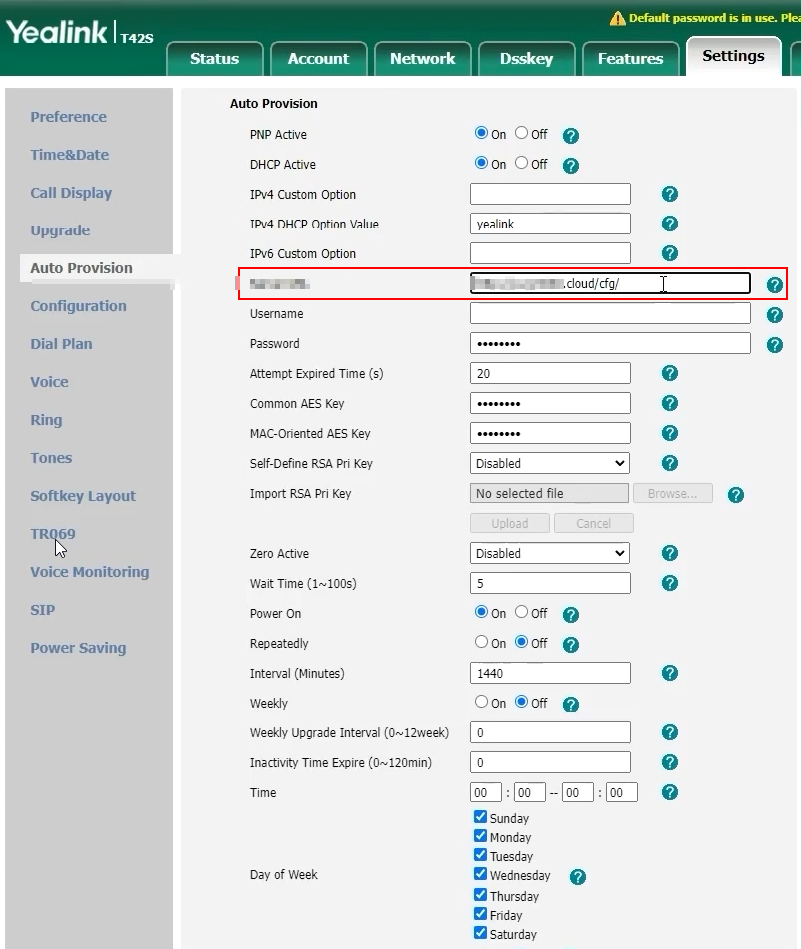
Confirming the Provisioning URLThe auto-provisioning URL depends on the NetSapiens data center the deployment is hosted on (for example,
http://p-nj.5060.cloud/cfg/for a New Jersey–based instance). The NetSapiens partner responsible for the deployment can confirm the correct URL if it is not already known.
- Select
Confirmand wait for the operation to complete - Select
Auto-Provision
The phone flashes and may reboot multiple times while it pulls its configuration. Once complete, it is ready to use on the platform.
Updated 3 months ago