
Call Park
Call Park lets an agent place an active call into a shared park zone, where another agent assigned to that zone can retrieve it.
Call Park lets an agent place an active call on hold in a shared location — a park zone — rather than transferring it directly, so any agent assigned to that zone can retrieve it. Park zones are configured by an administrator; see Park Zones.
Requires CallHub and Either Call Link or Xima WebRTCCall Park is not available for every site. See Confirming CallHub Mode Is Active.
Configures named holding areas where an agent can place an active call for another agent to retrieve.
Parking a Call
-
While on an active call, select the
Park Callicon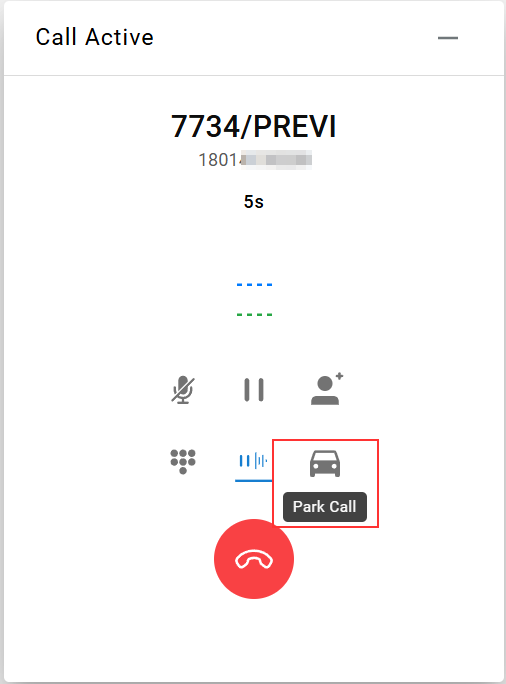
-
Choose a park zone from the menu
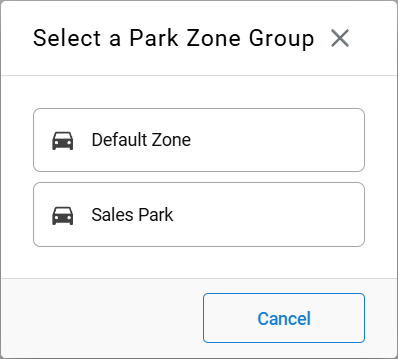
-
The call is parked immediately and appears as one parked call sitting in that zone, ready for pickup

Retrieving a Parked Call
-
Select
Parked Callsin the lower-left to locate the parked call -
Select
Retrieve Callto answer it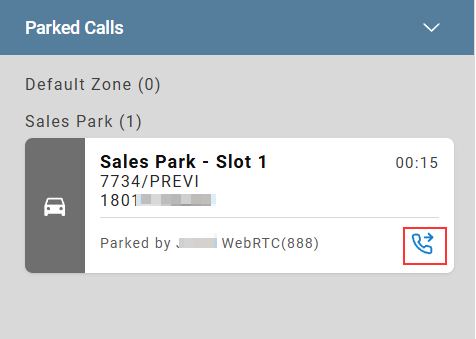
-
The call is removed from the zone once retrieved

Updated about 1 month ago