
Tiered Busy Codes (CallHub Only)
Tiered Busy Codes let an agent block new Skills-based calls, chats, and emails while remaining reachable for direct calls, or block all media entirely, without logging out
Requires Call HubTiered Busy Codes are available on sites running CC-Agent Client in CallHub mode (version 5.64+) and are not yet available on all sites. Xima Support can confirm whether a given site has Call Hub enabled and is a good candidate for it.
Tiered Busy Codes extend standard Busy Codes with two fixed availability tiers, Limited Availability and Unavailable, that control which kinds of media can still reach an agent while the agent is not accepting new work from their assigned skills.
Availability Tiers
| Tier | Behavior | Use Case |
|---|---|---|
Limited Availability | Blocks new Skills-based calls, chats, and emails from reaching the agent; direct calls — via a DID or another extension — still reach the agent | An agent who wants to remain reachable directly but is done taking new Skills-based media |
Unavailable | Blocks all new media from reaching the agent, whether Skills-based or direct | An agent stepping away from their desk who does not want to log out of CCaaS |
Creating a Tiered Busy Code
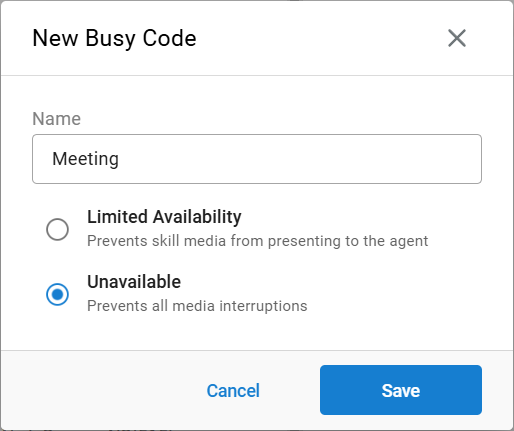
- Click
Create New Busy Code - Enter a name for the code
- Select
Limited AvailabilityorUnavailable— see Availability Tiers above - Click
Save
Assigning a Tiered Busy Code to Agents
- From the
Busy Codespage, select the desired agent(s) from the list on the left - Select the assigned code(s) from the list on the right
- Click
Saveto apply the changes
Using a Tiered Busy Code as an Agent
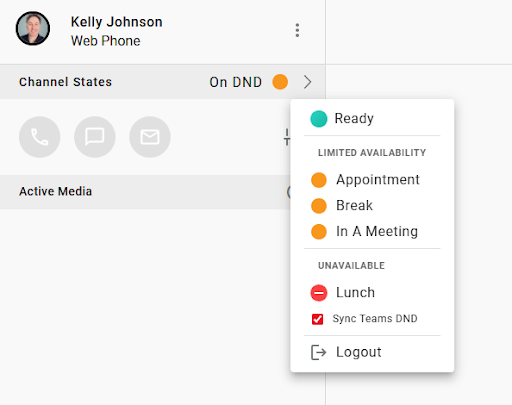
- In CCAC, select the status drop-down menu
- The new tiered options appear alongside the standard busy codes
- Selecting
Limited AvailabilityorUnavailablechanges the agent's status accordingly - Selecting
Readyreturns the agent to accepting all media, including Skills-based calls, chats, and emails
Updated 3 months ago