
Reports — Row Types
What each row type in Create Report represents and what to expect on the resulting report, grouped by the Summary, Record-Level, and Time-Based styles.
Every report built in Create Report is built around a row type, and every row type falls into one of three underlying styles: Summary, Record-Level, or Time-Based. The style determines what a report's rows represent and what columns are available. The Rows field shown when selecting a row type identifies which style a report will produce.
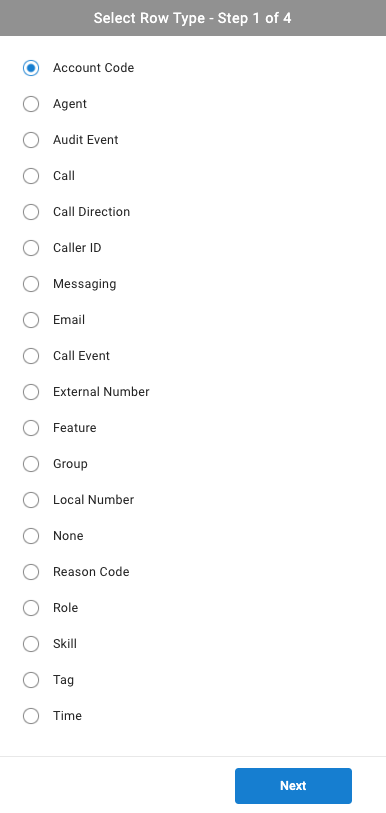
Summary Reports
Summary reports aggregate values — totaling or counting them — for a given grouping, rather than listing individual records. Each row represents one member of that grouping (one agent, one account code, one tag, and so on), with columns showing totals, averages, or percentages for that member.
| Row Type | What It Represents | What to Expect on the Report |
|---|---|---|
| Account Code | A configured account code, applied by agents to calls or chats to track the reason for the interaction | One row per account code, with call/chat counts and durations tagged with that code |
| Agent | An individual agent | One row per agent, with call, chat, and feature totals — such as answered/missed call counts, talking duration, and time spent in states like DND or After Call Work |
| Call Direction | How a call originated: Inbound, Outbound, Internal, Callback | One row per direction, with call totals and durations for that direction |
| Caller ID | A distinct caller ID value | One row per caller ID, with call totals, durations, and the external number(s) associated with it |
| External Number | A distinct external (outside the phone system) phone number | One row per external number, with call totals and durations tied to that number |
| Group | A phone-system group — a collection of agents who handle similar tasks and receive the same kind of incoming calls | One row per group, with call totals for that group |
| Local Number | A local number — a main line or direct agent number within the phone system | One row per local number, with call totals and durations for calls to that number |
| None | No grouping at all | A single row — the overall summary totals across everything in scope, the same summary shown at the top of every other report, without any breakdown beneath it |
| Reason Code | A configured reason code, applied by agents to explain a DND, group login/logout, or extension login/logout event | One row per reason code, with counts and durations for how often and how long it was used |
| Role | A CCaaS role — a named set of agents | One row per role, with totals for the agents assigned to it |
| Skill | A Contact Center skill (queue) | One row per skill, with Contact-Center-specific metrics — calls, chats, queue callbacks, and time agents spent logged into or ready for that skill |
| Tag | A tag applied to a call or event | One row per tag, with call/event totals associated with it |
Messaging and Email
Messagingand
Record-Level Reports
Record-level reports list one row per individual record rather than a total. Each row represents a single call, call event, feature, or audit event, identified by a searchable ID.
| Row Type | What It Represents | What to Expect on the Report |
|---|---|---|
| Audit Event | A single change made in the software | One row per audit event, identified by an Audit Event ID, with columns for the user account, access level, timestamp, and a description of the change |
| Call | A single call | One row per call, identified by a Call ID searchable in the CCaaS database and in Cradle to Grave, with columns for the call's parties, duration, whether it was answered, and any attached account code or notes |
| Call Event | A single event within a call — such as Queue, Ringing, or Talking | One row per event, identified by an Event ID, with columns for the associated agent, tag, and start/end time |
| Feature | A single agent feature instance — such as Do Not Disturb, or a Group/Skill or Extension login/logout | One row per feature instance, identified by a Feature ID, with columns for the agent, feature type, duration, and reason code |
Time-Based Reports
Time-based reports aggregate values the same way summary reports do, but bucketed by a time interval instead of by agent, group, or another grouping.
| Row Type | What It Represents | What to Expect on the Report |
|---|---|---|
| Time | A time interval — hour of day, day of week, week of month, or month of year | One row per interval, with the same kind of totals as a summary report, optionally broken into per-agent or per-skill sub-reports — useful for identifying peak or slow periods for staffing purposes |
Service-Level Formula ValuesTime reports offer a small number of values built from an editable formula rather than a plain total — for example,
% Calls Answered w/in SLAdivides calls answered within a configurable service-level window by total answered calls. The service-level window itself is adjusted through theSpeed of Answerfilter criteria when configuring the value.
Updated 3 months ago