
Missed Call in Agent's Call History, Phone Did Not Ring (RingCentral/Avaya Cloud Office)
Issue Description
A call came in and my phone only rang once or didn't ring at all, but I have a missed call in my call history.
NoteThe settings and examples listed below cannot be accessed or modified by Xima Support and should be reviewed and/or adjusted by an approved phone managing party. They are common examples shared for review.
Possible Causes
This article focuses on cause #3, as it's the most common cause of this issue.
- The agent's ring time was set to ring once (duration of 5 seconds).
- This is typically rectified on the majority of agents by adjusting their ring times.
- Within RingCentral/ACO, go to Users > Select User > Call Handling and Forwarding.
- Note the devices and their ring durations.
- Also check to see that the first phone set to ring in this settings menu is the phone the agent is currently using.
-
In the example below, the agent's softphone/app will ring first, and then the desk phone.
-
If they're only using their desk phone at this time, they won't get an opportunity to get the call before it rolls to the next agent.
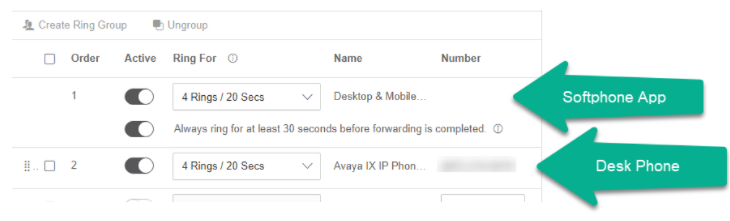
-
- Within RingCentral/ACO, go to Users > Select User > Call Handling and Forwarding.
- This is typically rectified on the majority of agents by adjusting their ring times.
- The RingCentral network packets were received out of order and/or delayed.
- Xima has taken some liberties with the backend on how to handle this packet ordering a bit better.
- Should be resolved on newer CCaaS builds.
- The customer legitimately hangs up while the call is presenting to the agent (the most common cause of this issue).
- In the examples below, we show the RingCentral/ACO output showing the calls in question. Each call corresponds to this cause.
-
Agent 1: the call was 2 seconds in length.

-
Agent 2: the call was 4 seconds in length, so it likely only rang once due to the customer hanging up before it was able to be answered by the agent.

-
Agent 3: the call was also 4 seconds in length, allowing for only one ring.

-
- To help provide proof of this occurrence, the RingCentral/ACO output is located within the login portal.
-
Navigate to Reports > Call Log.
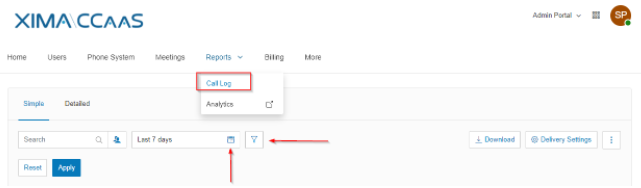
-
Filter based on the date and the agent in question reporting the issue, and check the total call length.
-
- In the examples below, we show the RingCentral/ACO output showing the calls in question. Each call corresponds to this cause.
Updated 3 months ago