
Outbound Extensions
Outbound Extensions are registered SIP extensions that agents place outbound calls through, each presenting its own caller ID and optionally assigned to a skill or agent.
An outbound extension is a SIP extension registered for placing outbound calls and callbacks. Each one carries the caller ID the phone system presents for that extension, and can be assigned to a skill or an agent so only they are offered it. For a caller ID number that does not need its own registered extension, use an Outbound Number instead.
Accessing Outbound Extensions
Outbound Extensions is accessible to accounts with Admin permissions.
- Navigate to
Admin (System) > SIP Extensions - All outbound extensions are listed under
Outbound Extensions; when none exist,No outbound extensions configured yet.is shown
Adding an Outbound Extension
- Select the
+icon in theOutbound Extensionsheader - Complete the following fields in the
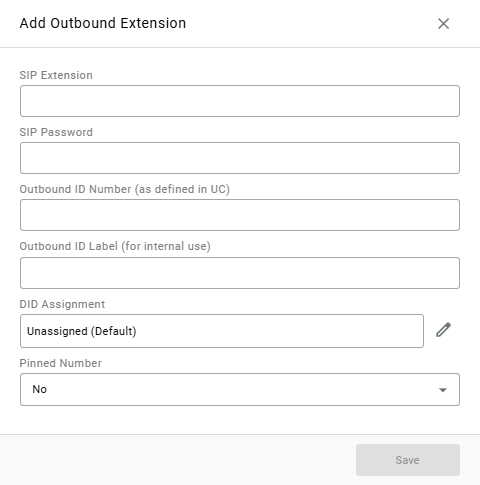
Add Outbound Extensionwindow:
| Field | Description |
|---|---|
SIP Extension | The extension's SIP username, as configured on the phone system |
SIP Password | The extension's SIP password |
Outbound ID Number (as defined in UC) | The caller ID number configured for this extension on the phone system |
Outbound ID Label (for internal use) | A name for the caller ID, shown to agents when they choose a number |
DID Assignment | Who is offered this caller ID. Defaults to Unassigned (Default). Select the pencil icon to assign it to one skill or one agent |
Pinned Number | Yes keeps this caller ID at the top of the assigned agents' list in CCAC. Defaults to No |
- Select
Save
Registration Required on CallHubOn accounts using CallHub, an outbound call placed from an outbound extension that is not registered fails rather than moving to another extension, and the agent is told the selected number has no line available.
How Agents Use Outbound Caller IDs
| Behavior | Description |
|---|---|
| Choosing a caller ID | Agents choose from the caller IDs available to them when placing a call in CCAC. Pinned numbers appear first |
| Default Outbound Number | Agents can set a caller ID that is pre-selected on every new call — see Default Outbound Number |
| Skill assignment | When the Auto-Select Skill from Outbound Caller ID voice setting is on, a call placed from a caller ID assigned to a skill is credited to that skill without prompting the agent |
| Callbacks | A skill's queue callbacks can present a specific caller ID — see Callback Caller ID |
An outbound extension is a SIP extension registered for placing outbound calls and callbacks. Each one carries the caller ID the phone system presents for that extension, and can be assigned to a skill or an agent so only they are offered it. For a caller ID number that does not need its own registered extension, use an Outbound Number instead.
Accessing Outbound Extensions
Outbound Extensions is accessible to accounts with Admin permissions.
- Navigate to
Admin (System) > SIP Extensions - All outbound extensions are listed under
Outbound Extensions; when none exist,No outbound extensions configured yet.is shown
Adding an Outbound Extension
- Select the
+icon in theOutbound Extensionsheader - Complete the following fields in the
Add Outbound Extensionwindow:
| Field | Description |
|---|---|
SIP Extension | The extension's SIP username, as configured on the phone system |
SIP Password | The extension's SIP password |
Outbound ID Number (as defined in UC) | The caller ID number configured for this extension on the phone system |
Outbound ID Label (for internal use) | A name for the caller ID, shown to agents when they choose a number |
DID Assignment | Who is offered this caller ID. Defaults to Unassigned (Default). Select the pencil icon to assign it to one skill or one agent |
Pinned Number | Yes keeps this caller ID at the top of the assigned agents' list in CCAC. Defaults to No |
- Select
Save
Registration Required on CallHubOn accounts using CallHub, an outbound call placed from an outbound extension that is not registered fails rather than moving to another extension, and the agent is told the selected number has no line available.
How Agents Use Outbound Caller IDs
| Behavior | Description |
|---|---|
| Choosing a caller ID | Agents choose from the caller IDs available to them when placing a call in CCAC. Pinned numbers appear first |
| Default Outbound Number | Agents can set a caller ID that is pre-selected on every new call — see Default Outbound Number |
| Skill assignment | When the Auto-Select Skill from Outbound Caller ID voice setting is on, a call placed from a caller ID assigned to a skill is credited to that skill without prompting the agent |
| Callbacks | A skill's queue callbacks can present a specific caller ID — see Callback Caller ID |
Updated about 17 hours ago