
Launch Pad — Highlights
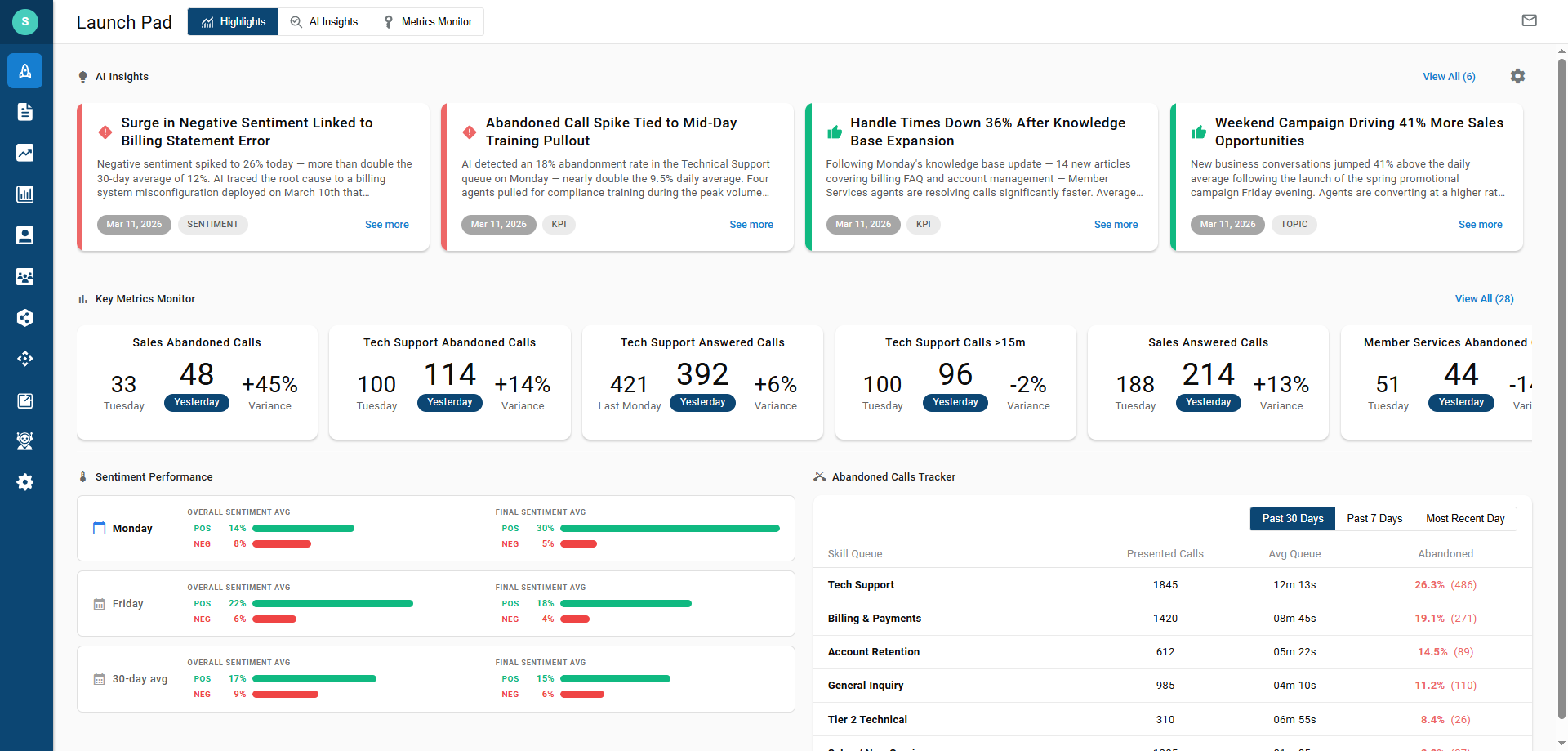
Highlights is the Launch Pad home screen, summarizing the most recent day of operation with top AI Insights, key metrics, sentiment performance, and abandoned calls by skill
Launch Pad is a retrospective hub for managers and administrators. It reviews the most recent completed day of operation and compares it against earlier days and 7-day and 30-day averages, so trends and anomalies surface without running reports by hand. It is not a replacement for Wallboards — wallboards show live activity, while Launch Pad focuses on trends over the last 30 days. Highlights is the first page shown, bringing the most notable results from AI Insights and Metrics Monitor together on one screen.
Requires Elite or QA Evaluation LicensingLaunch Pad is available to tenants licensed for QA Evaluation, which is included with Elite licensing.
Accessing Highlights
Highlights is accessible to accounts with Manager or Administrator access levels.
- Navigate to
Launch Pad > Highlights - The AI Insights, Key Metrics Monitor, Sentiment Performance, and Abandoned Calls Tracker sections are shown on this page
Default Landing PageFor Manager and Administrator accounts, Launch Pad opens automatically after logging in. Selecting the rocket icon at the top of the navigation bar returns to it at any time.
Page Layout
| Element | Description |
|---|---|
Highlights / AI Insights / Metrics Monitor | Tabs at the top of Launch Pad that switch between its three pages |
 | Opens the Daily Digest Configuration — see Daily Digest |
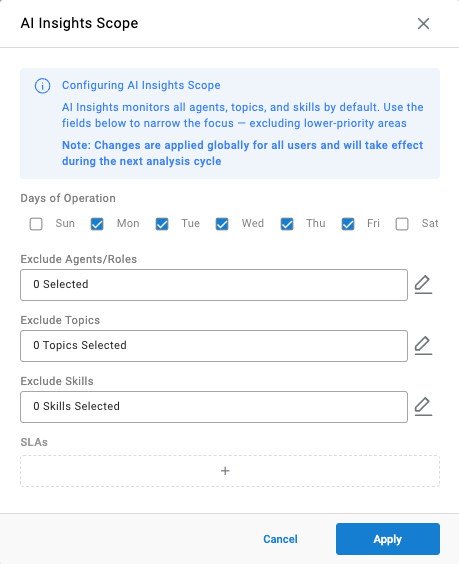
 | Opens the AI Insights Scope, which sets the days of operation and what AI Insights monitors — see Configuring AI Insights |
Key Metrics Monitor | Key metric widgets, sorted by the largest variance first |
AI Insights | The top row of insight cards from the most recent day of operation |
Sentiment Performance | Average sentiment for recent days of operation and the 30-day average |
Abandoned Calls Tracker | Monitored skills ranked by abandonment rate |
AI Insights
The top row shows the AI Insight cards generated overnight for the most recent day of operation, ordered by urgency. Selecting See more on a card opens its full investigation. Select View All to see every insight from the last 7 days on the AI Insights page.

Key Metrics Monitor
Each widget compares a metric's value for the most recent day of operation against a chosen baseline and shows the variance between the two. Widgets are sorted by the largest variance first; scroll horizontally to see more. Select View All to see every configured widget on the Metrics Monitor page. Selecting a widget opens a chart of that metric over time.

Sentiment Performance
Sentiment Performance compares the most recent day of operation's sentiment averages against the previous day of operation and the 30-day average, each shown as its own row.
| Column | Description |
|---|---|
| Overall Sentiment Avg | The average percentage of transcribed lines scored Positive (POS) and Negative (NEG) across calls |
| Final Sentiment Avg | The average Positive (POS) and Negative (NEG) sentiment for the final portion of each call — how calls ended |
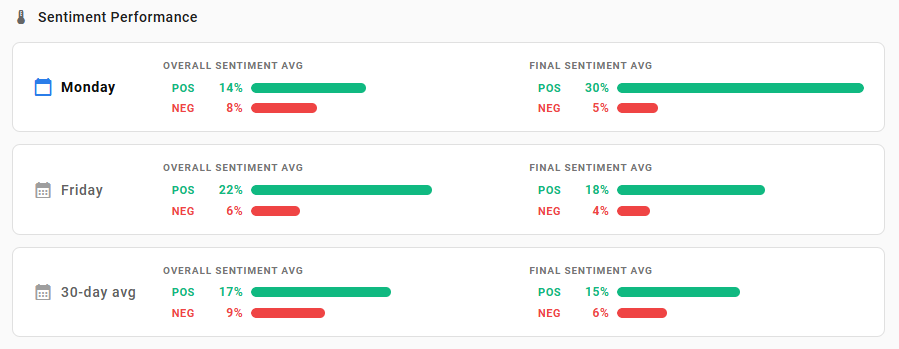
Bar ScaleThe bars max out visually at 30%, though higher values are supported. Sentiment averages rarely reach high percentages.
See Transcription Topics for how sentiment is scored.
Abandoned Calls Tracker
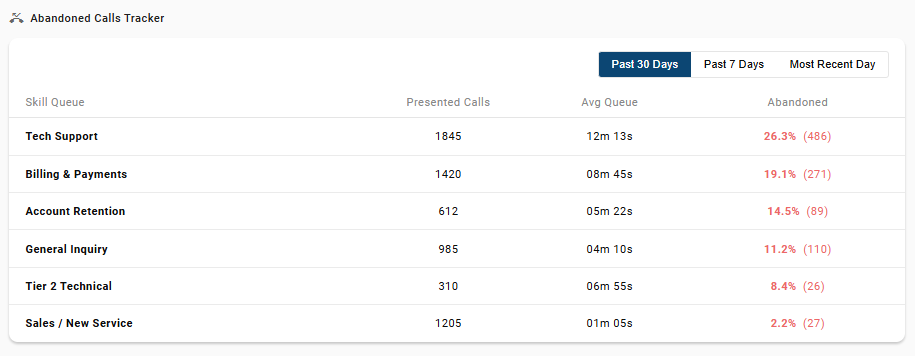
The Abandoned Calls Tracker ranks the monitored skills by abandonment rate, highest first, with the abandoned values shown in red. The buttons at the top switch between Past 30 Days, Past 7 Days, and Most Recent Day.
| Column | Description |
|---|---|
Skill Queue | The monitored skill |
Presented Calls | The number of calls presented to the skill, for context on queue volume |
Avg Queue | The average time calls spent in queue |
Abandoned | The abandonment rate, with the number of abandoned calls in parentheses |
Days of Operation
Launch Pad always reports on the most recent completed day of operation, as set in the AI Insights scope configuration — see Configuring AI Insights. For example, when a contact center operates Monday through Friday, Highlights on Monday shows Friday's results rather than Sunday's. Non-operational days are also excluded from the 30-day sentiment average.
Daily Digest
The Daily Digest is a summary email sent each selected workday morning, containing key AI Insights, anomalies, and metric variances from Launch Pad.
- Select the mail icon in the top-right corner of Launch Pad
- The
Daily Digest Configurationdialog opens - Complete the following fields:
| Field | Description |
|---|---|
Delivery Days | The days of the week the digest is sent, selected from Sun through Sat |
Agents | Agents who receive the digest; select the pencil icon to choose them |
Roles | Roles whose agents receive the digest; select the pencil icon to choose them |
Skills | Skills whose agents receive the digest; select the pencil icon to choose them |
Users | User accounts that receive the digest; select the pencil icon to choose them |
External Email Addresses | Additional email addresses outside CCaaS that receive the digest |
- Select
Save
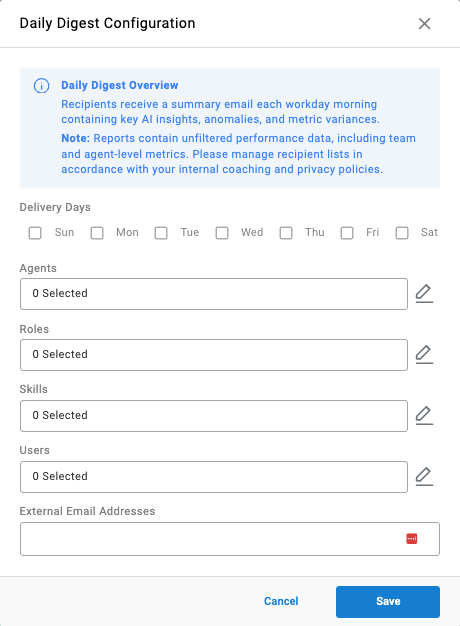
Digest Content Is UnfilteredThe digest contains unfiltered performance data, including team and agent-level metrics. Recipient lists should be managed in line with the organization's internal coaching and privacy policies.
No digest is sent until at least one recipient is configured.
Updated about 3 hours ago