
3CX — SIP Extensions (v18)
Registers a 3CX extension's SIP credentials in CCaaS so the contact center can handle calls through the platform.
Registering a SIP extension for 3CX requires an extension created in the 3CX portal and its SIP credentials, obtained from that extension's Phone Provisioning tab. These credentials are then entered in CCaaS to establish the SIP connection.
Accessing SIP Extensions
SIP Extensions is accessible to accounts with Admin permissions.
- Navigate to
Admin (System) > SIP Extensions - All registered SIP extensions are listed on this page
Target Platform Must Be Configured FirstTarget Platform must be configured before registering an extension.
Obtaining SIP Credentials from 3CX
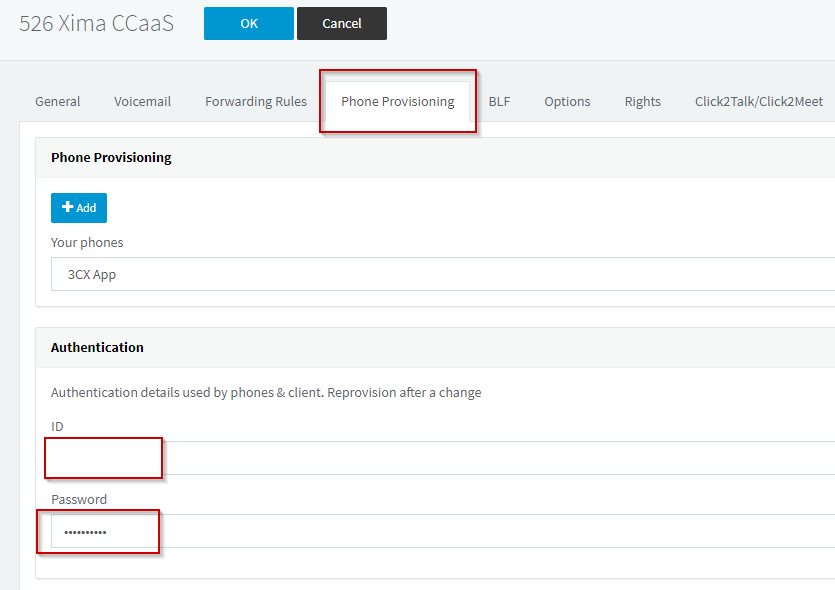
- In the 3CX portal, navigate to
Extensions, then select+ Addto create an extension, or select an existing one - Select the
Phone Provisioningtab - Under
Authentication, note the SIP Extension and SIP Password — select the eye icon to reveal the password
Registering the Extension in CCaaS
With SIP credentials in hand, the extension is added directly from the SIP Extensions page.
- Navigate to
Admin (System) > SIP Extensions - Select
+ - Enter the following fields using the credentials obtained from 3CX:
| Field | Description |
|---|---|
| SIP Extension | The extension number created in 3CX |
| SIP Password | The password listed under the extension's Phone Provisioning > Authentication section |
| Authorization ID | The ID listed under the extension's Phone Provisioning > Authentication section |
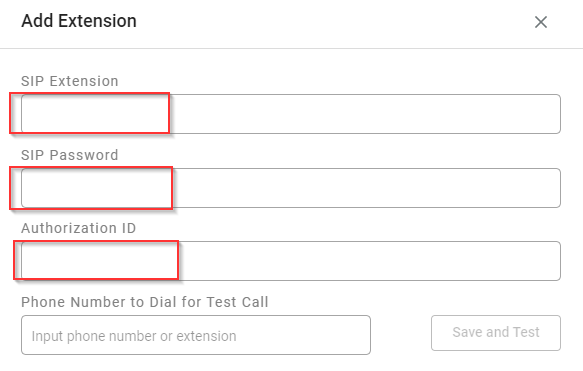
- Select
Save, thenOKto confirm - Registration typically completes within a minute — select
Refreshto update the status display
Additional Extensions and Call Capacity
Rather than pooling calls through a Ring Group or Queue the way other platforms do, additional CCaaS-registered extensions are set to Accept Multiple Calls and used as direct routing targets — 3CX does not reliably route calls through a Ring Group or Queue containing a CCaaS extension.
Updated 3 days ago