
"Reset Agent State" Option Within The Agent Client
Starting in version 5.25.1 of Xima CCaaS, a new option was introduced allowing agents to reset their state using an option within the CCAC. How do I utilize this function?
Answer
Please reach out to Xima Support first so they can enable the SHOW_CLEAR_CALL_BUTTON feature toggle for your site, then follow the steps below.
Steps
-
As above, please reach out to Xima Support so they can enable the
SHOW_CLEAR_CALL_BUTTONfeature toggle for you. -
Have your agents log into the Contact Center Agent Client as per normal.
-
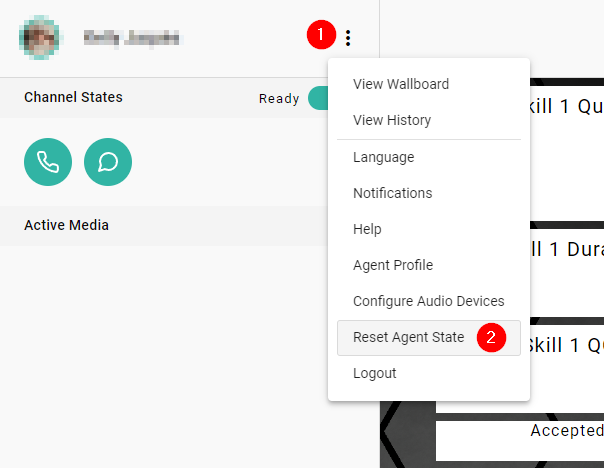
If they become stuck on a call, have them click on the ellipsis menu in the top left.
-
Select Reset Agent State from the menu and accept the change from the popup.
-
The agent's state will now be cleared, allowing them to take a new call.
Notes
There are two things to remember with this powerful tool:
- Resetting the agent's state will NOT end any actual call for the agent, which will continue to be connected through their softphone/hard phone. This is simply removing the call from Xima CCaaS, freeing them to take another call from the system.
- Do NOT click this button unless you're ready to be routed a new call. The agent's state will revert to "Ready," and any queued calls will be presented to them.
NoteThe reasoning for this tool is to allow your agents to return to a "Ready" state much faster, and to allow your agents to resolve any stuck events without Admin intervention.
Updated about 7 hours ago