
Web Service Integration
Web Service Integration lets CCaaS send call and chat data to an external web service when a defined event occurs.
Web Service Integration enables CCaaS to push data to an external web service when a defined call or chat event occurs. On the configured event, the system sends an HTTP request to the target URL, optionally including call data as URL parameters, form parameters, or a custom request body.
Accessing Web Service Integration
Web Service Integration is accessible to accounts with Supervisor or Admin permissions.
- Navigate to
API Enablement > Web Service Integration - All configured Web Service Integration Profiles are listed in the management panel
Creating a Web Service Integration Profile
- Click
Show List Viewto show the list of profiles - Click
Addto create a new profile - Configure the profile fields (see below)
- Use the
Test Web Serviceoption to verify the request is generated correctly and handled by the target web service - Click
Save
When ConfiguringThe target web service and its business logic (authenticating the request, processing the payload) are built and maintained outside of CCaaS. Research the target CRM or web service ahead of time to determine the required URL and data.
Profile Configuration
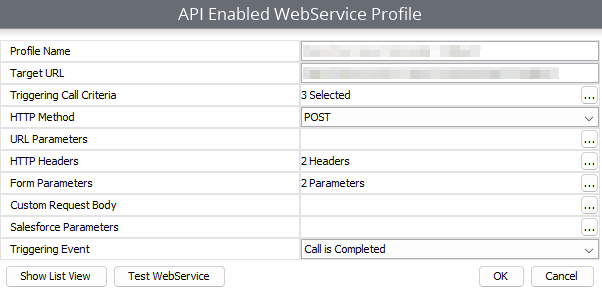
| Field | Description |
|---|---|
| Profile Name | A name to identify the Web Service Integration Profile. |
| Target URL | The base URL of the request; the system sends a request to this URL when a call meets the configured criteria. |
| Triggering Call Criteria | The conditions a call must meet to trigger a request. If no criteria are configured, every call triggers a request. |
| HTTP Method | The HTTP method used for the request. |
| URL Parameters | Optional parameters appended to the Target URL as query string values, populated with call data or a static string — see Available Parameters below. |
| HTTP Headers | Optional custom headers included with the request. |
| Form Parameters | Optional parameters included in the request body rather than the URL, populated the same way as URL Parameters. |
| Custom Request Body | Defines a custom content type and payload for the request. |
| Triggering Event | The point in the call lifecycle when the request is sent — see Triggering Event below. |
Available Parameters
URL Parameters and Form Parameters can be populated with a static string or one of the following call data values:
| Variable | Resolved Value |
|---|---|
Empty Value | An empty string. |
Account Codes | A comma-delimited list of account codes (e.g., Opp Won, Large Sale, Processed in CRM). |
Agent | The agent associated with the last event on the call, including name and extension (e.g., John Doe (154)). |
Agent Extension | The agent's extension only (e.g., 154). |
Agent Name | The agent's name only (e.g., John Doe). |
Call Direction | The direction of the call: Internal, Inbound, Outbound, or Intersite. |
Caller Name | The caller ID name. |
DNIS | The DNIS associated with the last event on the call. |
External Number | The number of the other party associated with the last event on the call. |
Group/Skill | The group or skill associated with the last event on the call. |
Location | On an inbound call, the location of the calling party's number. On an outbound call, the location of the dialed party's number. |
Media ID | The long-form UUID of the call, message thread, or email. |
Report Media ID | The short-form ID used in Cradle to Grave and Reports in place of the UUID — useful for comparing API data against a report. |
Time | The start time of the call, in milliseconds since January 1, 1970, 00:00:00 GMT. |
Tag | A comma-delimited list of tags associated with the call's events. |
Transcript | The full transcript of the call. |
Transcript Summaries | An AI-generated summary of the full transcript. |
Transcript Topics | The topics detected from the transcript. |
Legacy EquivalentsOlder profiles may reference
Call IDorReport Call ID— legacy equivalents ofMedia IDandReport Media IDrespectively.
Triggering Event
| Event | Behavior |
|---|---|
| Call is Presenting | Triggers when the call is ringing the agent, before being answered. |
| Call is Connected | Triggers when the agent answers the call. Recommended over Call is Presenting for most use cases. |
| Call is Complete | Triggers when the call disconnects, before the recording is processed — excludes any post-call notes or account codes. |
| Call and Recordings Processed | Triggers after the call ends and any associated recording has finished processing. |
| Call is Updated | Triggers when a completed call's recording is processed, and again whenever account codes are added to or removed from the call afterward. |
Updated about 6 hours ago